
← Back To Blog
Automation Rules for Upwork Outreach
A freelancer wakes up to 8 qualified proposals filed automatically, replies waiting in under 5 minutes, and a booked call from a rule that filtered for budget-over-1000 and niche-matched projects. That works only when the system has an explicit trigger-condition-action structure, not blind speed.
Freelancers in the middle of Upwork outreach feel the same pressure. They're scanning fresh jobs, burning through Connects, and trying to decide whether to move fast or play it safe. The right answer is neither guesswork nor chaos. Automation rules are precise instructions that watch for a defined event, test a condition, and execute a controlled action when both line up.
What Automation Rules Actually Are
Mornings for a seller often look like this. Open the dashboard, scan new projects, compare budgets, check fit, draft a proposal, and watch Connects disappear one by one. It's workable, but it's slow, and it depends on you catching everything before someone else does.
A rule-driven workflow feels different. New projects appear, the system filters by budget and niche, drafts a pitch, queues the right follow-up, and moves on without asking you to re-check every detail. That's why I think of automation rules as a recipe book for outreach, not a mystery box.
The simple mental model
A rule is just a task-level transformation. Something happens, a condition decides whether the rule should fire, and then an action runs. That structure matters because it gives you a way to inspect and improve the workflow instead of hoping the software “does the right thing.”
For sellers trying to grow on Upwork, that means thinking in terms of repeatable work. Classification, routing, drafting, monitoring, and follow-up are all good candidates for automation. Judgment-heavy work, client nuance, and exception handling still belong with a person.
Practical rule: if you can't explain what the rule watches for, what it checks, and what it does next, it's too loose to trust.
The cleanest way to build that mindset is to treat each rule like a documented workflow, not a shortcut. If you're mapping this to broader sales automation patterns, this overview of sales automation is a useful companion because it frames automation as process design rather than volume chasing.
Why beginners get this wrong
New users often confuse automation with unsupervised action. That's the trap. A rule can be narrow, reversible, and easy to audit, or it can be broad, opaque, and risky.
The difference is control. If the rule can be versioned, tested, and paused, you're building a system. If it just fires whenever something looks close enough, you're gambling with account health and Connects.

The Trigger-Condition-Action Framework
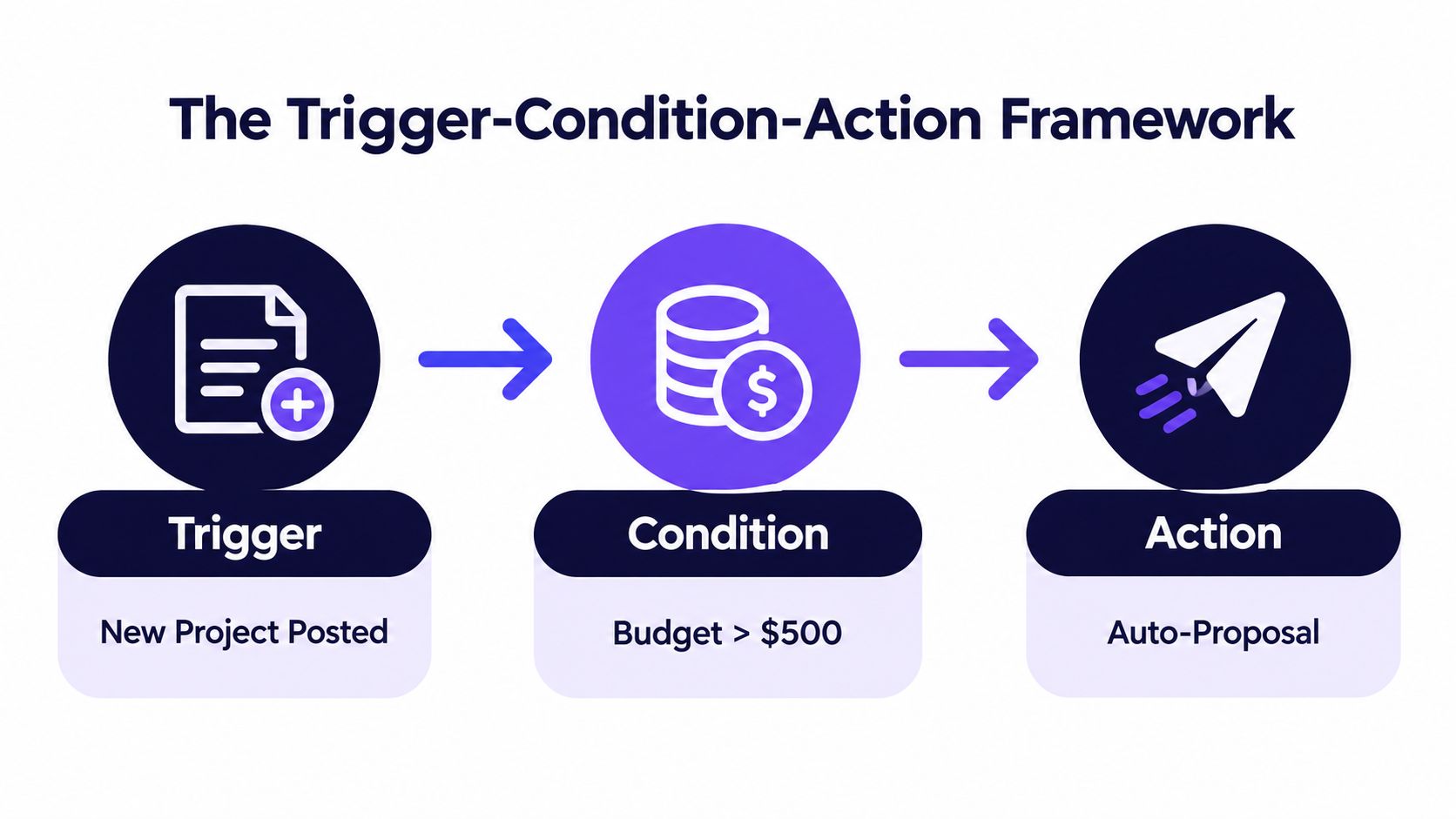
The cleanest automation rules follow Event-Condition-Action logic. One thing happens, the system checks whether the rule applies, and then it acts only if the check passes. That separation keeps the workflow readable instead of fragile.
How it maps to Upwork work
An event is the change in state. A new project gets posted, a client replies, a proposal is sent, or a message lands in your inbox. A condition is the Boolean filter that decides whether the rule should continue, such as budget, category, client history, or skill fit.
An action is the output. Draft the proposal, submit it, schedule a follow-up, or send the task to a human reviewer. When those three layers stay separate, you can see exactly what happened if performance changes.
Here's the useful part for agencies. A new e-commerce project can trigger a rule. The condition can check for fit, budget, and whether the client profile is worth a closer look. The action can draft a customized pitch and queue it for review before anyone sends it.
Why the separation matters
If the rule misfires, you do not want to debug a tangled script. You want to know which event fired, which condition passed, and which action executed. That is the difference between a workflow you can govern and a workflow you can only hope behaves.
A rule that can be replayed is easier to trust than a rule you can only observe after it runs.
That idea matters in proposal work. When you are dealing with incoming jobs and limited Connects, a clear ECA design lets you test one variable at a time instead of changing everything at once.
A useful rule example
A new project gets posted in your niche. That is the trigger. The condition checks for a fit with your services and a budget floor you are willing to respect. The action drafts a proposal and sends it to review.
Why Safety Must Come Before Speed
A fast reply can help on Upwork, but speed without controls creates account risk. Upwork defines bots broadly, including scripts, browser extensions, and third-party services that automatically send requests, collect data, or perform actions faster than a human. Unauthorized automation can lead to warnings, temporary restrictions, or permanent blocks. That boundary has to shape the workflow from the start.
Safety is a design choice
The strongest automation rules are the ones you can explain, log, and stop when conditions change. Human review, audit trails, and pause controls do that work. They keep one bad rule from spreading across an entire agency workflow.
A useful resource on that control mindset is approval-gated write tool safety, because it treats safety as a property of the workflow, not as a vague policy promise.
Different tasks deserve different treatment. Job discovery can be highly automated if the rule only surfaces candidates. Drafting can often be automated if a human approves the final text. Submission needs tighter gates, because it touches Connects and account risk. Messaging and scraping deserve the most scrutiny, especially when the action reaches outside the platform or touches data collection.
The risk matrix sellers actually need
Automation should follow the risk level of the action.
- Job discovery: automate filtering, but keep a human in the loop for edge cases and niche drift.
- Drafting: automate first-pass copy, then review tone, fit, and client-specific nuance.
- Submission: gate this step tightly, because the cost and account exposure are real.
- Messaging: use caution, since repetitive or overly fast outreach can look unnatural.
- Scraping: avoid loose automation here, because data collection and policy boundaries are where teams get careless.
That approach gives agencies a safer operating rhythm. Discovery rules can run wide. Drafting rules can run with review. Submission rules should stay narrow. The goal is automation depth matched to the risk of each action.
If you are comparing outreach systems more broadly, this sales outreach automation reference reinforces the same principle, automation should cut manual drag without removing judgment where it matters.
Real Rule Examples for Upwork Outreach
Theory gets easier when you see it behave like a real agency workflow. A good rule set doesn't just catch jobs, it helps a team decide which opportunities deserve attention, which need review, and which should be ignored.

Project discovery and qualification
A discovery rule might trigger when a new project appears in your niche. The condition checks for budget-over-200, verified-client status, and no more than 10 existing proposals. The action drafts a proposal and places it in a review queue instead of sending it blindly.
That keeps low-quality jobs from eating reviewer time. It also stops your team from racing every posting just because it's new.
A qualification rule can work on inbound messages. If a prospect asks a technical question, the system can prepare a customized response and attach a relevant portfolio piece. That's better than sending a generic reply, because the message carries evidence instead of filler.
Follow-up and boosted submissions
Follow-up rules need patience. If a proposal has been sent and there's no reply after a set waiting period, the rule can check whether the client has viewed the proposal yet. If not, it can queue a polite nudge that reinforces one value point, not three.
For boosted submissions, the rule should be even tighter. Trigger only when the project is high-fit, the Connects budget is available, and the historical conversion pattern supports the extra spend. Then cap the boost amount so the rule can't keep bidding past a defined ceiling.
The best proposal automation is boring in the right way. It fires only when the fit is clear, the cost is known, and a human can still intervene.
That's also where a resource like Cyndra on scaling without headcount is helpful, because it frames automation as operating leverage, not just message volume. If you want a deeper process walkthrough, this Upwork proposal automation guide fits well alongside these examples.
Where safety gets built in
Every rule should carry throttling, a daily Connects cap, and a pause-on-error setting. If a rule starts misfiring, rollback should be simple. If a rule performs well, you can raise its confidence gradually instead of widening the scope overnight.
Building a Safe Operating Model
A safe operating model turns separate automation rules into something an agency can run every day. The goal isn't to create more automation, it's to create more control around automation so the workflow stays understandable as more bidders, niches, and clients get added.
Versioning, throttling, and budget control
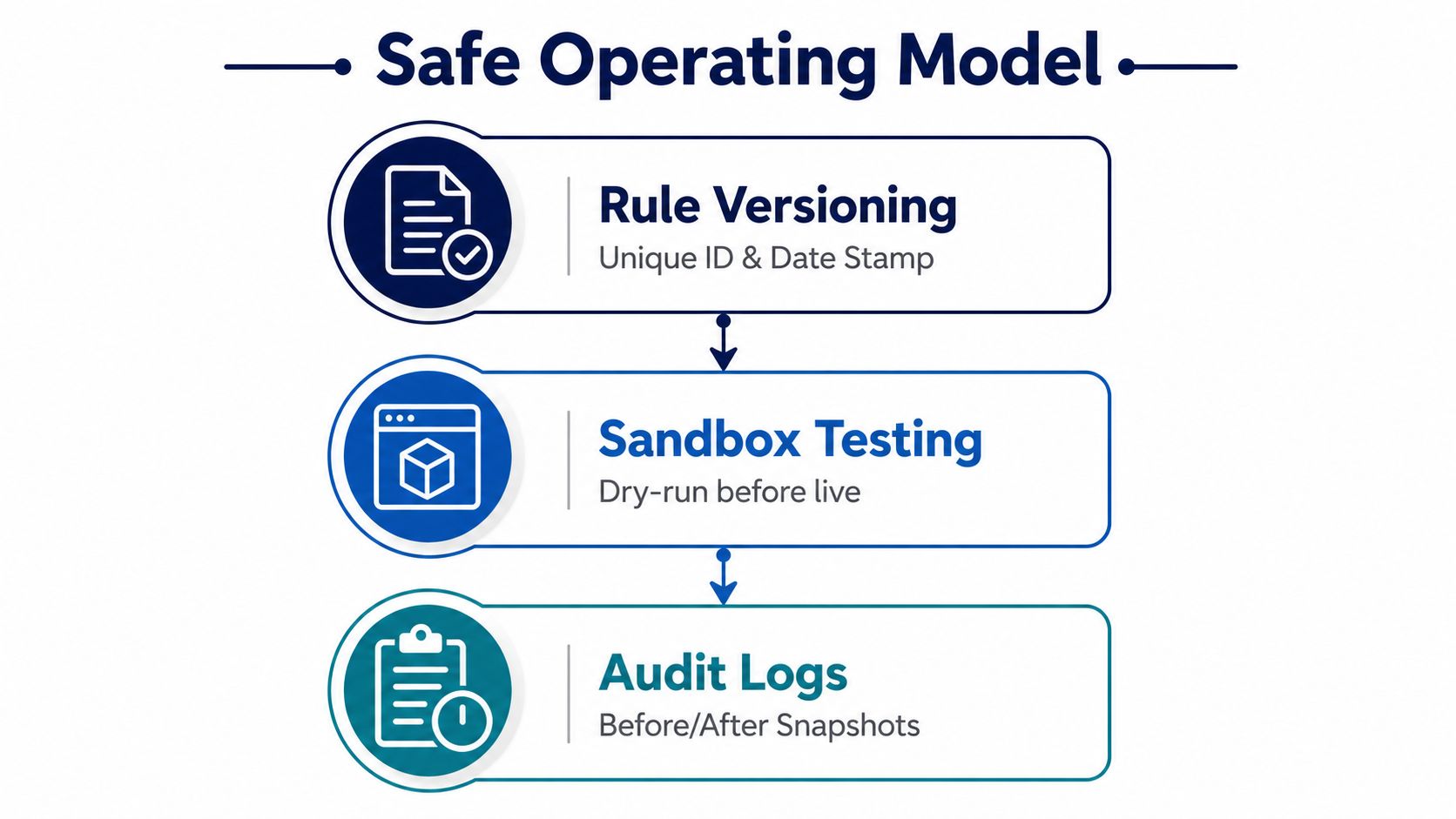
Rule versioning should be standard practice. Every change needs a unique identifier, a date stamp, and a before-and-after snapshot so the team can roll back if performance drops. Without that, nobody knows which edit caused the problem.
Throttling is the next guardrail. Each rule needs a maximum daily execution count, a cooldown period between retries, and a burst guard that pauses the rule when errors spike. Connects control matters just as much, because an automated workflow can burn through spend quickly if no one watches the cap.
Escalation and auditability
Low-confidence matches should route to a human before anything is submitted. High-confidence matches can move automatically, but only if the rule records the event, the condition result, the action outcome, and the downstream response. Those logs make the workflow explainable when a client asks what happened or when a proposal behaves oddly.
For teams that want a deeper comparison point on browser-based automation resilience, Puppeteer automation that holds up is a useful technical read because it shows how reliability depends on disciplined execution, not just automation intent.
A simple operating model usually includes three layers:
- Rule versioning: track every change, then keep the previous snapshot ready for rollback.
- Sandbox testing: run the logic on historical or dry-run events before going live.
- Audit logs: capture what triggered, what passed, and what action followed.
Feedback loops that improve the rules
A good rule set gets sharper over time because the outcomes feed back into the conditions. If a proposal leads to a reply, a booked call, or a contract, that outcome should inform the next version of the rule. If the rule keeps matching weak jobs, it should be tightened or disabled.
That's the difference between automation and drift. One learns from outcomes. The other just keeps running.
Best Practices for Measuring What Matters
Teams judge automation by proposal volume, and that's the wrong scoreboard. More activity can hide worse fit, weaker replies, and heavier reviewer load. The better approach is to measure whether the rule improves qualified conversations and booked calls.
Measure the outcome, not the noise
Start with qualified-project precision. Ask a simple question, how many triggered rules landed on jobs that were genuinely worth pursuing? If that number is weak, the rule is too broad or the niche filter is sloppy.
Then look at proposal-to-reply conversion by rule version, not just overall averages. That tells you which logic is producing useful outreach and which rule is just generating busywork. Add median response latency so you can see whether the automation is getting you into the conversation faster.
Keep the dashboard small
A useful review loop doesn't need a giant reporting stack. It needs a few metrics that connect action to revenue.
- Booked-call conversion: shows whether the rule is producing sales-ready leads.
- Duplicate-action rate: catches retry problems and misfiring triggers.
- Manual control comparison: checks automation-assisted proposals against a similar manual group.
- Rollback triggers: define the conditions that pause a weak rule before it wastes more spend.
If a rule increases activity but not replies or calls, it's not helping. It's just making the dashboard noisier.
Weekly reviews work well because they're frequent enough to spot drift and slow enough to avoid overreacting to one bad day. Keep the comparison fair, too. Match by niche, budget band, reviewer, and rule version so you're comparing like with like.
Discipline means disabling underperforming automation quickly and scaling only the rules that consistently improve the quality of outreach. That is how a team protects account safety while still moving faster than manual outreach ever could.
If you want to build Upwork outreach that's fast, controlled, and easier to measure, Earlybird AI is built for that workflow. It connects to your Upwork account, automates proposal and message handling, and helps agencies manage outreach without giving up visibility or control. Visit Earlybird AI to see how a safer automation system can support your team.




