
← Back To Blog
How to Make Proposal for Upwork That Wins Clients
You've just spent twenty minutes rewriting a proposal that sounded good in your head. The job matched your skills, the budget looked fair, and your sample seemed relevant. Two days later there's no view, no reply, and no clue whether the problem was the opening, the price, or the job itself. That uncertainty is the cost. Learning how to make a proposal for Upwork that wins clients starts before you write a sentence, with deciding which jobs deserve your Connects and your time.
Treat Your Upwork Proposal Funnel Like a Sales Pipeline
A new alert lands and the job looks perfect. Right tools, right budget, a brief you could deliver without stretching. Your finger hovers over Submit a Proposal, and that click is where many bidders make their first expensive mistake. They treat it as a writing task when it is really a sales decision.
An Upwork proposal is the first stage of a measurable funnel: sent, viewed, interview or client response, hire. Each stage fails for a different reason. If proposals are not viewed, your positioning, price signal, profile title, or job choice is failing before the writing gets read. If they are viewed but start no conversations, the body, proof, or scope is not convincing. If conversations stall, pricing, availability, or interview handling is usually the weak link.
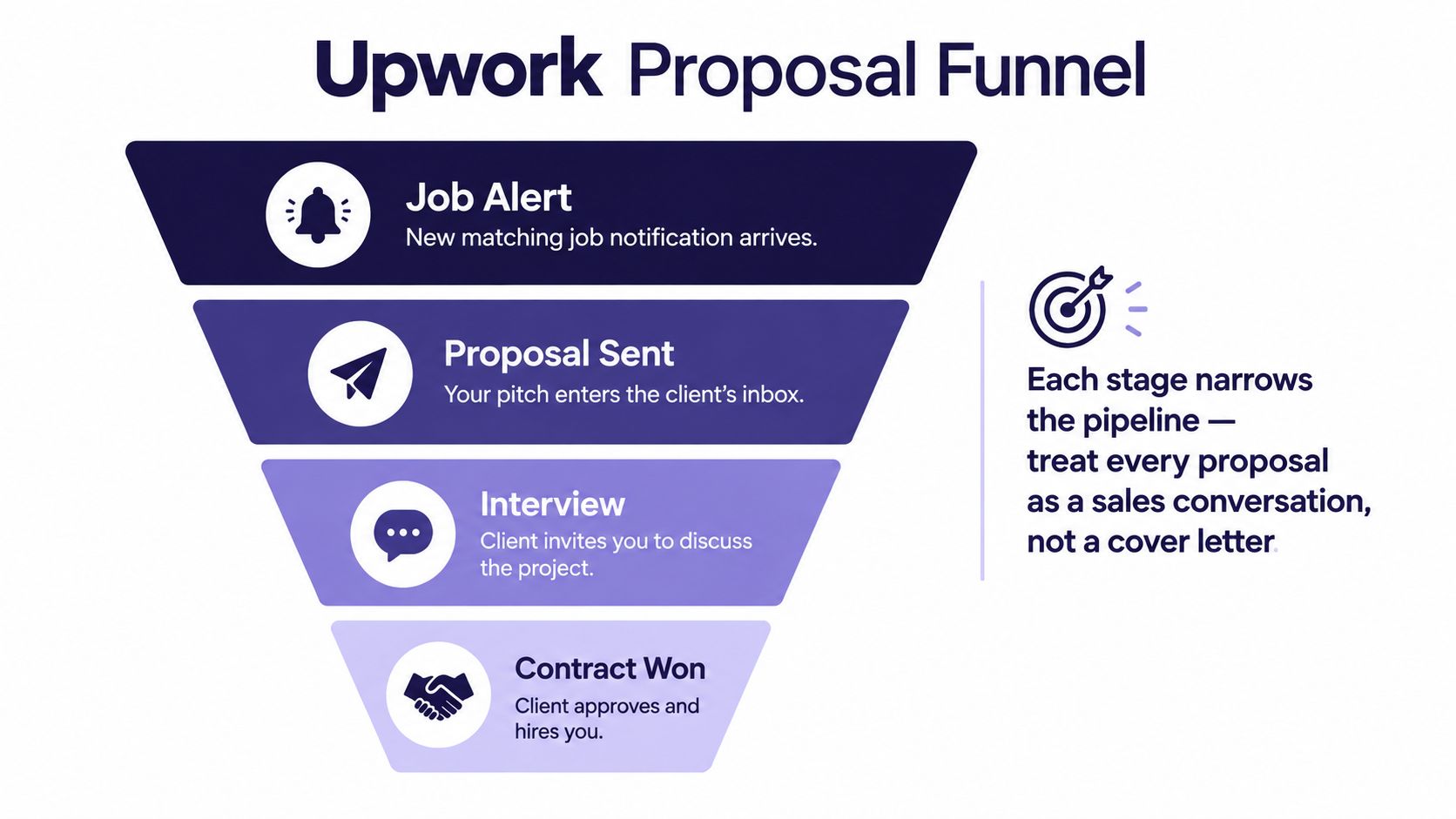
That distinction decides what you fix first. A sharper opener cannot explain a low view rate on jobs where the client never opens anything. A higher boost cannot rescue a proposal that gets opened and ignored. Agencies running several bidders learn this fast because wasted Connects stack up across every seat, every niche, every week.
Read the Job Before You Read Your Own Draft
Start with Proposal Insights and client history. Upwork's Proposal Insights data on hourly submissions and client activity surfaces total submissions, opened proposals, shortlisted freelancers, client responses, average bids, bidder earnings, and top skills for a job post. You are looking for signs of life and fit, not one magic number.
Check whether the client has hired before and what their feedback pattern says about communication and payment. Look at how many people they intend to hire, whether interviews are already underway, and whether proposal volume has turned the post into a lottery. Compare required skills and average bids with proof you can show. A crowded post can still be worth bidding on, but only when your relevance is obvious in the first screen.
Then test the brief against proven delivery. Can you point to comparable work, rather than adjacent experience? Does the timeline fit your real availability? Is the outcome clear enough to scope without inventing half the project? If those answers take effort, the job is not ready for a proposal.
Use a Five Question Go or No Go Check
Run this check before you spend Connects. It should take minutes, not a research session.
- Has this client hired before: Prior hires and credible feedback suggest they know how to start a contract.
- Is the client active on this post: Opened, shortlisted, or answered proposals signal the job is still alive.
- Does my proof match directly: You need one comparable sample or result, not a broad portfolio dump.
- Is competition proportionate: Heavy submission volume demands exceptional fit or a clear reason you will stand out.
- Can I scope the first step: If deliverables, timeline, and price basis are all vague, qualify further or walk away.
Practical rule: Sending more polished proposals is not always the improvement with the biggest payoff. Better opportunity selection often moves reply rate faster than better adjectives.
The pipeline mindset earns its keep here. If you are building repeatable outbound, the discipline behind building a structured sales pipeline applies directly: qualify, advance or disqualify, and refuse to confuse activity with progress. Teams that struggle to hold that line under pressure sometimes use outside structure too, and sales deadline accountability help can keep weekly targets honest without lowering the qualification bar.
Track results by segment, not by memory. Log niche, client history, opening angle, sample type, price model, and whether you boosted. Then calculate view rate, reply rate, and hire rate by cohort. Your last win will feel personal. Cohort data tells you which project types deserve more outreach next week and which ones steadily drain your balance.
That discipline is the foundation for everything that follows. Write only after a job clears minimum evidence of fit, active hiring, and scope clarity. You will send fewer proposals. You will also stop paying to learn lessons the job post already told you for free.
Write an Opening That Mirrors the Client's Real Problem
Clients scan the first lines to decide whether to open the rest. Your opener has one job. Prove you read the brief and understood the business problem behind the task list.

Start with the client's stated pain, constraint, or desired result in language close to their own. If a SaaS founder says trial users aren't converting because the landing page explains features instead of outcomes, don't open with your years of copywriting experience. Open with that conversion problem. Name the page, the audience, and the result they're trying to change.
Compare two openings for that job. The weak version says you're a passionate, detail oriented expert who'd love to help and believes you're the best fit. It could be pasted into any post, so it signals nothing. The stronger version says the current page lists product features before it answers why a trial user should care, then proposes restructuring the headline and proof around the main activation outcome. The second opener qualifies you while it describes the work.
A Repeatable First Paragraph
Use this sequence. Restate the problem in one sentence, name the desired outcome, then add one observation only a credible applicant would make. That observation might be a missing dependency, a risky assumption, or a smarter first milestone. Keep it specific and brief.
Match the client's formality without copying their voice. A technical founder writing short, direct briefs doesn't need a cheerful preamble. A marketing lead describing brand tone probably doesn't want a dry spec sheet. Mirror the problem, not the personality.
Avoid phrases that claim strengths without evidence. Detail oriented, hardworking, and perfect fit are filler. Replace them with a relevant detail from their project. If the client mentioned a deadline, reference the work that must happen first. If they mentioned a tool, explain how you'd use it in the delivery, not just that you know it.
A question opener can work when the brief leaves a genuine decision open, such as which audience segment matters most. Don't use a question to sound clever, and don't ask anything the post already answered.
The walkthrough below is useful for seeing how this opening logic looks in practice before you adapt it to your own niche.
Anchor the Body in Proof, Plan, and One Sharp Question
Most proposals lose the interview in the middle. The opener earns attention, then the body drifts into a résumé summary, a long skills list, and three samples that don't match the job. Keep the body tight enough that a busy client can see competence without working for it.
Upwork's guidance on addressing client needs and keeping proposals concise recommends addressing the client's specific needs immediately, presenting relevant past results or samples, and structuring the proposal in roughly two or three short paragraphs. That length forces choices. You can't include everything, so include what reduces hiring risk.
Pick One Proof Point That Travels
Choose the single most comparable result or sample you have. Comparable means similar audience, deliverable, constraint, or business outcome. A screenshot or direct sample usually beats a claim because the client can judge quality themselves. Attach only highly relevant work. An impressive but unrelated portfolio piece tells the client you didn't understand the assignment.
State the proof plainly. Say what you delivered, for what kind of client, and what changed or shipped as a result if you can verify it. Don't stack unsupported superlatives. One credible proof point tied to this brief is stronger than five loose credentials.
Turn Requirements Into a Short Plan
Map each major requirement to a deliverable and, where it matters, an acceptance criterion or milestone. The plan doesn't need to be a full project spec. It needs to show sequence. Diagnose first, deliver the core asset, review, then revise or hand off. Name assumptions and exclusions for complex work, especially dependencies on client feedback, access, or source materials.
A client should finish your second paragraph knowing what they'll receive, when they'll see the first version, and what you need from them to start.
Close with one high value clarifying question. Good questions expose a decision that affects scope, timeline, or quality. Ask which conversion action matters most, which existing asset must be preserved, or who approves the final version. Bad questions repeat the brief or dump discovery work onto the client.
End with a single low friction next step, such as a short call to confirm scope or a reply to your question. Don't offer three calls to action. The structure is outcome diagnosis, comparable proof, method, deliverables and timeline, question, next step. If a sentence doesn't serve one of those jobs, cut it.
Price the Work in a Way the Client Can Approve
Pricing fails when the client can't tell what they're approving. A number without scope looks risky at any level. A higher number with clear milestones, assumptions, and deliverables often feels safer than a cheap estimate that will obviously grow.

Hourly pricing suits exploratory or ongoing work where volume and direction will change. Quote your rate with an expected weekly range so the client can budget. The signal is flexibility, but you carry the burden of showing momentum through updates and visible output. If you're still calibrating that rate, guidance on setting an Upwork hourly rate and this guide to confident freelance rate setting are practical starting points for grounding the number in costs and positioning rather than competitor panic.
Fixed price pricing suits defined deliverables with a clear finish line. Split it into milestones the client can approve in stages. Each milestone should name the output, review point, and what counts as done. That structure protects the client from paying for vague progress and protects you from one large, under scoped fee swallowing every revision.
The Same Project Priced Two Ways
Take a short brand identity project. Hourly, you'd quote your rate, estimate the weekly time range, and describe check ins after research, concepts, and refinement. Fixed price, you'd break it into discovery and directions, selected concept development, then final files and guidelines. The work is similar. The approval experience is different.
Estimate all phases, including communication, revisions, file preparation, and handoff. Add a small allowance for unexpected issues rather than pricing the happiest path. State what is excluded, such as extra concepts, copywriting, or source files beyond the agreed set. Vague timelines and under scoped fixed fees are where margin disappears.
A lower bid can make sense when the project gives you a directly reusable proof asset in a niche you're entering. Say that to yourself explicitly before you discount. Don't bid low merely because average bids look low. Defend a higher rate with specificity, relevant proof, and fewer unknowns, not with a paragraph about quality.
Budget Connects and Decide Whether to Boost
Connects aren't a formality. They're your acquisition spend, and Upwork varies the requirement with project size, scope, and market demand. Treat every submission as a small media buy. If the job wouldn't justify the spend after your qualification check, better writing won't rescue the economics.
Set a weekly or monthly Connects budget by niche and bidder if you work in a team. Reserve the largest share for project types where your view and reply rates are already proven. Keep a smaller test allocation for new segments. Without that split, urgent looking posts will consume the budget before your best fit work appears.
Understand What a Boost Actually Buys
Boosting bids additional Connects to place your proposal at the top of the client's Proposal Manager, ahead of unboosted proposals. Clients see a Boosted icon and a note that additional Connects were used. Visibility improves. Relevance doesn't.
The mechanics matter. Upwork's explanation of when boost bids are charged states a freelancer is charged the boost bid only when the proposal finishes among the top four bidders or earns an eligible client interaction such as opening, shortlisting, or messaging. If it finishes outside the top four and gets no eligible interaction while boosted, the extra Connects are refunded after the auction closes.
You can boost a proposal only once for a particular job. You can't submit plain, watch the competition, then add a boost later. If you're outbid, your proposal stays visible below the boosted listings. That one shot structure means the decision belongs in qualification, not in a last second impulse.
Boost strong fit and strong proof. Never boost a weak match hoping placement will compensate for relevance.
Boost when the client shows hiring activity, your proof is directly comparable, your price basis is credible, and the contract value justifies both the standard cost and the boost. Skip it when the brief is vague, the client appears inactive, or you would need the client to overlook a skills gap. For agencies, allocate boost budget centrally. Individual bidders competing for visibility will overspend on exciting logos and underfund the repeatable niches that convert.
Track boosted and unboosted cohorts separately. If boosts raise views but not interviews, placement isn't your constraint. Fix the opener, proof, or price signal before buying more attention.
Follow Up Without Pushing the Client Away
Silence after submission doesn't always mean rejection. Clients get busy, jobs stall internally, and shortlists sit untouched. A useful follow up gives the client a new reason to reopen the conversation. A needy follow up gives them a reason to archive it.
Send the first nudge only when you can add information. That might be a relevant sample you should have attached, a concise answer to a risk in the project description, or a proposed first milestone that makes starting easier. Keep it short. Reference the specific project outcome, add the new point, and end with one easy reply path.
For warm leads who viewed your proposal or replied once, be direct and helpful. Restate the next step and remove scheduling friction. For cold leads with no signal, one polite, value led message is enough. Repeated check ins without new information read as pressure, and pressure damages the reputation you need for the next job that client posts.
Two Templates You Can Personalize Fast
For a viewed proposal with no reply, write something like this. "I saw you may still be reviewing options for the landing page rewrite. One way to reduce risk is to start with the headline and hero proof as a first milestone, then decide on the full page after review. Want me to outline that first step?" You've added a scope option, not a guilt trip.
For an interview that went quiet, try this. "Following up on scope and timing. I can start with the audit and first concepts once we confirm who approves the draft. If priorities changed, no problem, just let me know and I'll close the loop on my end." That gives the client permission to say no, which paradoxically makes a real answer more likely.
Know when to step back. If the client has hired someone else, stopped activity on the post, or ignored a clear next step after a genuine exchange, stop. Put the energy into qualified new bids. The broader principles in following up with clients without damaging the relationship apply here. Persistence is professional only while it's useful.
Keep Automation on the Safe Side of the Line
Follow up is where many freelancers start looking for automation, so get the compliance boundary clear before you scale anything. Upwork's rules on bots, API access, and abusive automation require users who automate part of their workflow to request an Upwork API key, and behavior such as spam proposals, spam invites, or scraping public or private data can trigger account restrictions or permanent blocks.
That isn't a ban on all assistance. It's a line between human approved help and abusive mass activity. Drafting support that you review, personalize, and send deliberately is a different risk profile from blasting unreviewed proposals or scraping data to target clients. Don't let a tool submit anything you wouldn't defend line by line.
- Verify authorization: Confirm how the tool accesses Upwork and whether API permission is required for its workflow.
- Review every message: A human should approve proposals and follow ups before they represent your account.
- Respect account ownership: Don't share accounts or run multiple accounts without permission, a trap for agencies with several bidders.
- Check data handling and limits: Understand what data is stored, how access is secured, and whether activity could resemble spam.
Account loss erases reviews, history, and pipeline. No reply rate tactic is worth that trade. Scale the reviewable parts, research and drafting, and keep judgment with the person whose profile is on the line.
Run a Weekly Proposal Diagnostics Loop
Pick one short review slot each week and run the same loop. You're not hunting for motivation. You're deciding what to send more of, what to fix, and what to stop funding with Connects.
Upwork proposal analytics and the four stage funnel track proposals sent, viewed, client responses, and hires. Start there, then segment your own log by niche, opening angle, proof type, price model, client history, and boost usage. Averages hide the pattern. Cohorts reveal it.
Diagnose by Stage, Not by Feeling
Low views point to job selection, competition, timing, profile signal, or opening visibility. Fix qualification and first lines before rewriting your whole body. Views without replies point to proof relevance, scope clarity, or price credibility. Interviews without hires point to your call, terms, availability, or milestone structure.
Keep a one page scoreboard. Track Connects spent, boost Connects refunded, proposals sent, views, replies, interviews, hires, and revenue started. Add a short note on which sample you attached and which question you asked. Within a few cycles you'll see which proof assets earn conversations and which niches consume spend without returning interviews.
Change one variable at a time in the next batch. Test a sharper opener in one niche, a different sample in another, or milestone pricing where hourly quotes stall. Then keep what the funnel confirms. That's how to make a proposal for Upwork into a system instead of a fresh act of hope every time an alert pings.
If your team is spending more time hunting jobs and drafting bids than talking to qualified clients, Earlybird AI can help you identify relevant Upwork opportunities, prepare personalized proposals, and stay on top of follow ups with human review built in. Visit the site to see how it fits your agency workflow and turn your proposal funnel into a steadier source of interviews.




