
← Back To Blog
Is LinkedIn Sales Navigator Worth It? a 2026 ROI Guide
At US$119.99 per month per license for Core and US$159.99 for Advanced, LinkedIn Sales Navigator is worth it only when LinkedIn already drives a meaningful part of your acquisition motion. If your team mainly sells through email, phone, or events, the subscription can become an expensive research tab rather than a pipeline engine.
That distinction matters more than the feature list. Sales Navigator is a premium sales workflow built around LinkedIn's member data, relationship signals, account monitoring, and InMail. It isn't a general-purpose contact database or a complete outbound system. The right question is not whether the product has useful capabilities. It does. The question is whether those capabilities improve the channel your sellers already use.
What Sales Navigator Actually Costs in 2026
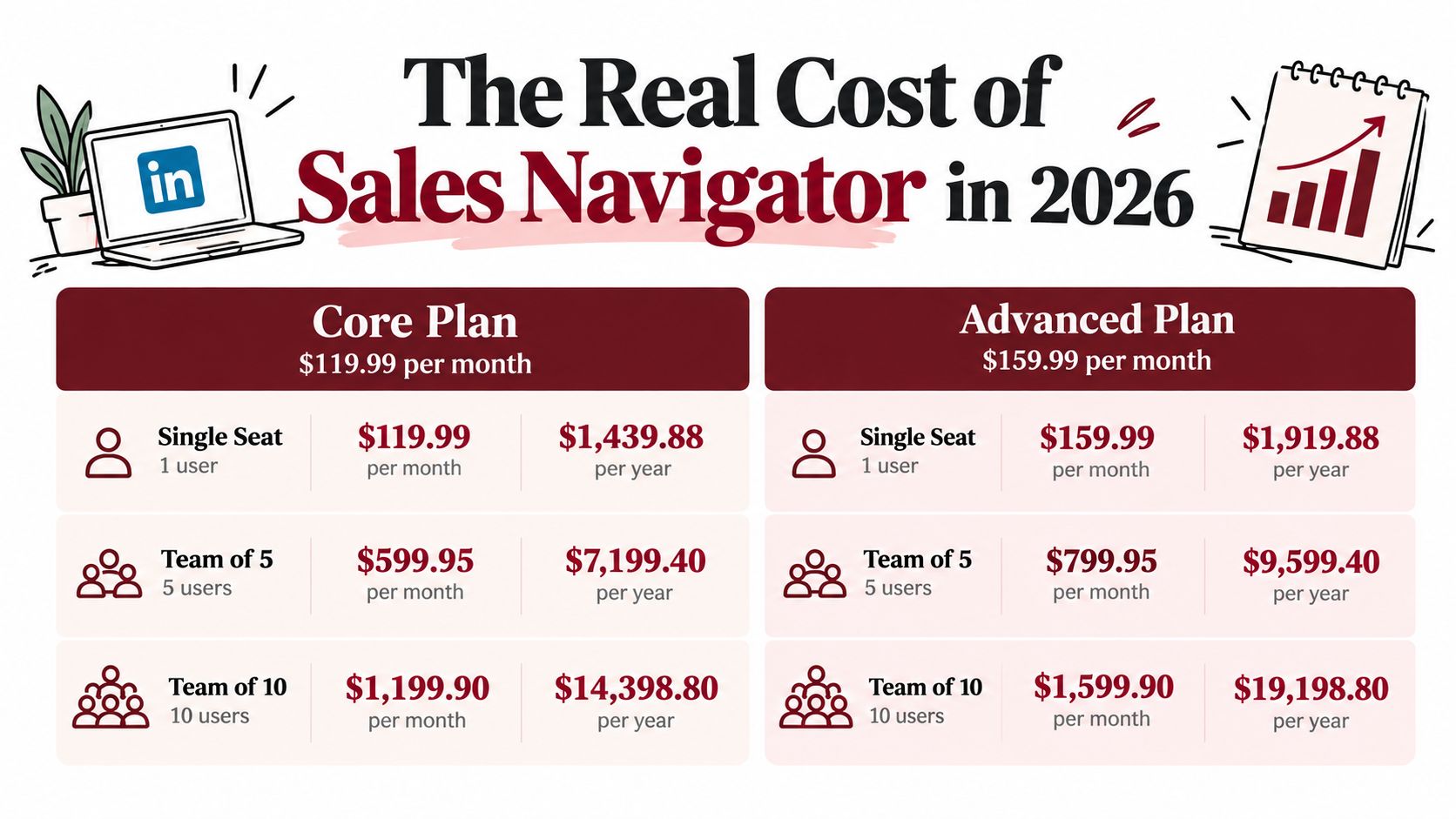
LinkedIn's published pricing places the Core plan at US$119.99 per month per license, or US$1,079.88 per year, while Advanced costs US$159.99 per month per license, or US$1,799.88 per year. LinkedIn advertises annual billing as a 25% savings, but the annual commitment still matters for a small sales team. See the official Sales Navigator plan comparison for the current structure.
License multiplication changes the decision quickly. One Core seat costs US$1,439.88 over a year on monthly billing. Three seats cost US$4,319.64, and ten cost US$14,398.80. At Advanced pricing, the comparable totals are US$1,919.88 for one seat, US$5,759.64 for three, and US$19,198.80 for ten. These amounts exclude tax, VAT, administrative seats, and separate data or sequencing software.
LinkedIn also offers higher tiers for team and enterprise workflows. Advanced+ pricing is handled separately and generally sits above the published Core and Advanced floor. International buyers should model VAT or sales-tax treatment before approval because the amount charged can vary by billing location.
Each user can save up to 10,000 leads and accounts, indicating that the product is designed for sustained prospecting rather than occasional networking. LinkedIn documents this capacity in its lead-saving guidance.
Start with channel fit
Before comparing filters, evaluate three operating conditions:
- Pipeline source: Does LinkedIn already contribute a meaningful share of closed-won revenue?
- Daily behavior: Will each paid user search, save, research, and message prospects inside the platform?
- Measurement: Can your CRM connect LinkedIn activity to meetings and opportunities?
If those conditions are absent, the recurring license is difficult to justify. The cost is fixed, while the value depends on channel use. A rep focused mainly on cold email or calling may still use Sales Navigator for research, but that activity may not create enough incremental pipeline to cover another subscription.
InMail capacity is limited rather than unlimited. The exact credit rules are covered in the hidden-costs section below.
Annual billing lowers the advertised monthly equivalent but reduces flexibility. Treat the purchase as a channel investment, estimate the qualified opportunities LinkedIn must generate to cover the seats, and test that assumption against actual source data.
What Each Tier Delivers
Sales Navigator tiers should be evaluated by the role LinkedIn plays in acquisition, not by feature count. The tool earns its cost when LinkedIn is a primary prospecting channel and sellers consistently convert LinkedIn research into conversations. It underperforms when the team's real motion depends on email, phone, partnerships, or inbound demand.
| Feature | Core (US$119.99/mo) | Advanced (US$159.99/mo) | Advanced+ (pricing not published; quote required) | Enterprise (Custom) |
|---|---|---|---|---|
| Prospect search | Advanced LinkedIn search | Advanced search with broader team workflow | Advanced search and account workflows | Custom organization setup |
| InMail | 50 credits per month | 50 credits per month | Tier-specific capacity | Custom allocation |
| Saved leads and accounts | Up to 10,000 per user | Up to 10,000 per user | Up to 10,000 per user | Up to 10,000 per user |
| Team collaboration | Limited | Expanded collaboration features | Advanced collaboration | Enterprise administration |
| CRM workflow | Limited or unavailable depending on setup | More team-oriented workflow | Direct CRM-oriented capabilities | Custom integration |
| Best fit | Individual LinkedIn prospecting | Structured sales teams | Larger teams with deeper workflow needs | Organizations requiring custom controls |
LinkedIn documentation states that Core, Advanced, and Advanced Plus each include 50 InMail credits per month per user. Unused credits can accumulate to 150 total credits, and transferred credits remain available for up to 90 days, subject to the LinkedIn InMail credit rules. InMail therefore functions as a limited outreach allocation, not an unlimited messaging channel.
Core supports individual discovery
Core fits a seller who needs stronger search, recommendations, alerts, and saved lists. Those capabilities improve account and prospect selection while keeping relevant LinkedIn activity visible. They do not provide contact enrichment, sequencing, or a complete multichannel follow-up process.
The commercial test is whether LinkedIn produces outcomes beyond browsing. Track qualified leads saved, meaningful replies, meetings sourced, and opportunities influenced. Profile views and searches indicate usage, but they do not establish return on spend. A practical review of Core's search, lists, alerts, and messaging limits is available in Sales Navigator Core's features and real value.
Advanced supports coordinated account work
Advanced is easier to justify when multiple sellers pursue the same account universe. Shared lists, relationship mapping, account tracking, and team reporting can reduce duplicate research and clarify handoffs. The value comes from coordinated execution, not from giving managers a larger feature set.
That benefit depends on operating discipline. If sellers do not maintain saved accounts or connect activity with pipeline stages, Advanced adds collaboration features without producing reliable management data. A team with a LinkedIn-led motion can gain from the shared workflow. A team that rarely prospects on LinkedIn may just pay for unused coordination.
Advanced+ and Enterprise require operational scale
Higher tiers fit organizations where CRM synchronization, account ownership, buying-role visibility, and administrative reporting shape daily sales work. They are harder to defend for a small team that needs targeted search and occasional outreach.
Enterprise pricing is custom, so buyers must request a commercial proposal and compare it with the existing sales stack. The relevant question is whether usage can be tied to territory planning, account progression, and revenue reporting. If those connections do not exist, a premium tier increases software cost without improving channel economics.
Sales Navigator Compared to Free LinkedIn and Competing Tools
Sales Navigator wins on LinkedIn-native data and relationship context. It doesn't automatically win on total contact coverage or cost of ownership.
| Tool | LinkedIn Data Depth | Contact Reach | Workflow Fit | Annual Cost Per Seat |
|---|---|---|---|---|
| Free LinkedIn | Basic profile and network visibility | Mostly connection-led | Manual research and networking | No paid Sales Navigator license |
| Sales Navigator | Deep LinkedIn search, saved leads, account monitoring | Beyond first-degree connections through InMail | Strong for LinkedIn-first prospecting | Core or Advanced license pricing |
| ZoomInfo-style platform | LinkedIn context is secondary | Direct contact and firmographic coverage | Strong for data-led outbound | Vendor-specific, generally a separate premium cost |
| Apollo or Outreach | Limited LinkedIn social context | Email and sequence-oriented reach | Strong for multichannel cadence | Vendor-specific subscription |
| Combined stack | Broadest coverage | LinkedIn, email, and phone through separate tools | Strongest when ownership and sync are clear | Multiple subscriptions |
Free LinkedIn is enough for a seller with a narrow target list and a relationship-led motion. It provides profile research and connection opportunities, but it lacks the dedicated prospecting workflow, InMail capacity, and structured lead alerts that justify Sales Navigator for higher-volume users.
ZoomInfo-style platforms solve a different problem. They're designed to provide direct contact data and firmographic depth, which helps teams that rely on calling and email. Sales Navigator supplies LinkedIn context and social proof, but it intentionally doesn't replace a direct-contact database. Buying both can improve coverage, yet it also creates duplicate records and a larger reconciliation burden.
Email-first tools such as Apollo or Outreach fit teams that judge productivity by sequence volume, reply handling, and follow-up consistency. They're weaker when the seller needs LinkedIn activity, shared connections, or job-change context to personalize the first touch. A team that starts with email and adds LinkedIn only occasionally may get more value from an email-first platform plus free LinkedIn.
For teams deciding how to combine these layers, build your ideal sales stack with Mail offers a useful way to think about email tooling alongside prospect research. The practical answer is often a stack, not a winner. Sales Navigator can be the LinkedIn layer, while a contact-data or sequencing tool handles the channels LinkedIn doesn't cover.
That approach also supports a more focused lead generation workflow with LinkedIn. The stack works when each tool has a defined job. It fails when several systems store different versions of the same account and no one owns data hygiene.
Adoption Patterns and Where the Tool Pays Off
The clearest adoption signal comes from the difference between large and small B2B sales organizations. One 2026 industry compilation reported Sales Navigator usage among 78% of B2B sales teams with more than 100 representatives, compared with 31% among teams with fewer than 50 representatives. The figures appear in the 2026 LinkedIn statistics compilation.
That gap doesn't prove that large teams always achieve better ROI. It shows that large teams are more likely to have the operating conditions that make the product useful: defined territories, repeatable prospecting, managers who monitor usage, and enough account volume to justify specialized research.

Three deployment contexts
Enterprise account teams usually get the strongest fit when sellers manage named accounts and use warm paths to reach buying committees. The platform helps identify role changes, account activity, and possible introductions. The commercial test is whether those signals lead to more qualified conversations, not whether the team saves many profiles.
Mid-market teams sit in the uncertain middle. Sales Navigator can support a disciplined workflow, but a small number of users may not create enough shared activity to justify the premium tier. Managers should inspect meetings sourced per seat, list refresh frequency, and CRM synchronization before expanding licenses.
Small businesses and transactional sellers often face the opposite problem. They may appreciate the filters but lack the contact volume, deal complexity, or LinkedIn engagement needed to use them consistently. A narrow seller may find free LinkedIn plus a focused data or email tool more efficient.
Operating test: If account lists aren't refreshed, prospects aren't contacted, and opportunities aren't attributed, adoption is only license utilization, not ROI.
Teams that want to turn LinkedIn profiles into pipeline should define the handoff from profile discovery to outreach, qualification, and CRM ownership. Sales Navigator supports that chain, but it doesn't create the chain. For teams evaluating automation and prospect research together, AI for sales prospecting is relevant only after the team has defined which leads deserve action.
Ideal Buyer Personas and Their ROI Math
The same license can be economical for one seller and wasteful for another. Use the persona math below as a model, then replace the assumptions with your own contribution margin, win rate, and average contract value.
| Persona | Recommended Tier | Monthly Cost | Target Meetings/Month | Average Deal Size | Pipeline to License Ratio |
|---|---|---|---|---|---|
| Agency SDR serving multiple client accounts | Advanced | US$159.99 per license | 15 | US$400 | About 50x based on stated pipeline value |
| Solo B2B freelancer | Core or free LinkedIn | Core at US$119.99 if purchased | Qualitative break-even test | Above US$3,000 for paid viability | Depends on one or more wins |
| Enterprise account executive | Advanced+ or Enterprise, subject to quote | Custom or tier-specific | Must be measured by sourced opportunities | Existing account economics | Team-level attribution required |
The agency SDR
An agency SDR managing 8 to 12 client accounts may need numerous saved searches, shared relationship context, and CRM synchronization. At 15 qualified meetings per month and an average deal value of US$400, the stated pipeline value is US$6,000 per month. Compared with a US$119.99 Core license, that is approximately a 50x pipeline-to-license ratio, before considering delivery costs, conversion rates, and client retention.
That ratio is only useful if the meetings are well qualified and attributable to LinkedIn activity. During the first 60 days, the SDR should track InMail replies, connection acceptance, qualified-meeting rate, and opportunities created from saved-lead activity. The tool should be downgraded or removed if the meetings come from other channels.
The solo freelancer
A solo B2B freelancer should be more skeptical. A narrow ICP with fewer than 50,000 LinkedIn members can be researched without the full depth of a premium team workflow, particularly when monthly target volume stays below 200 prospects. Core becomes defensible when one incremental project covers the subscription, but Advanced is difficult to justify without collaboration, CRM needs, or a larger account universe.
The first 60 days should focus on qualified replies, calls booked, and closed-won revenue linked to LinkedIn. If the freelancer can't identify a repeatable path from search to conversation, free LinkedIn may be enough.
The enterprise AE
An enterprise AE with an existing book of business and coordinated demand generation can benefit from account alerts, buying-role mapping, and CRM-connected research. The value may appear as reduced research effort and better timing rather than a directly sourced meeting. That makes attribution harder, so the manager should compare account progression, opportunity creation, and CRM hygiene across users.
Track response rate, meetings influenced, opportunity stage movement, and the completeness of synchronized account records during the first 60 days. Don't approve a higher tier solely because the AE has a large territory. Approve it when the team can show that account intelligence changes seller behavior.
The Hidden Costs Most Reviews Ignore
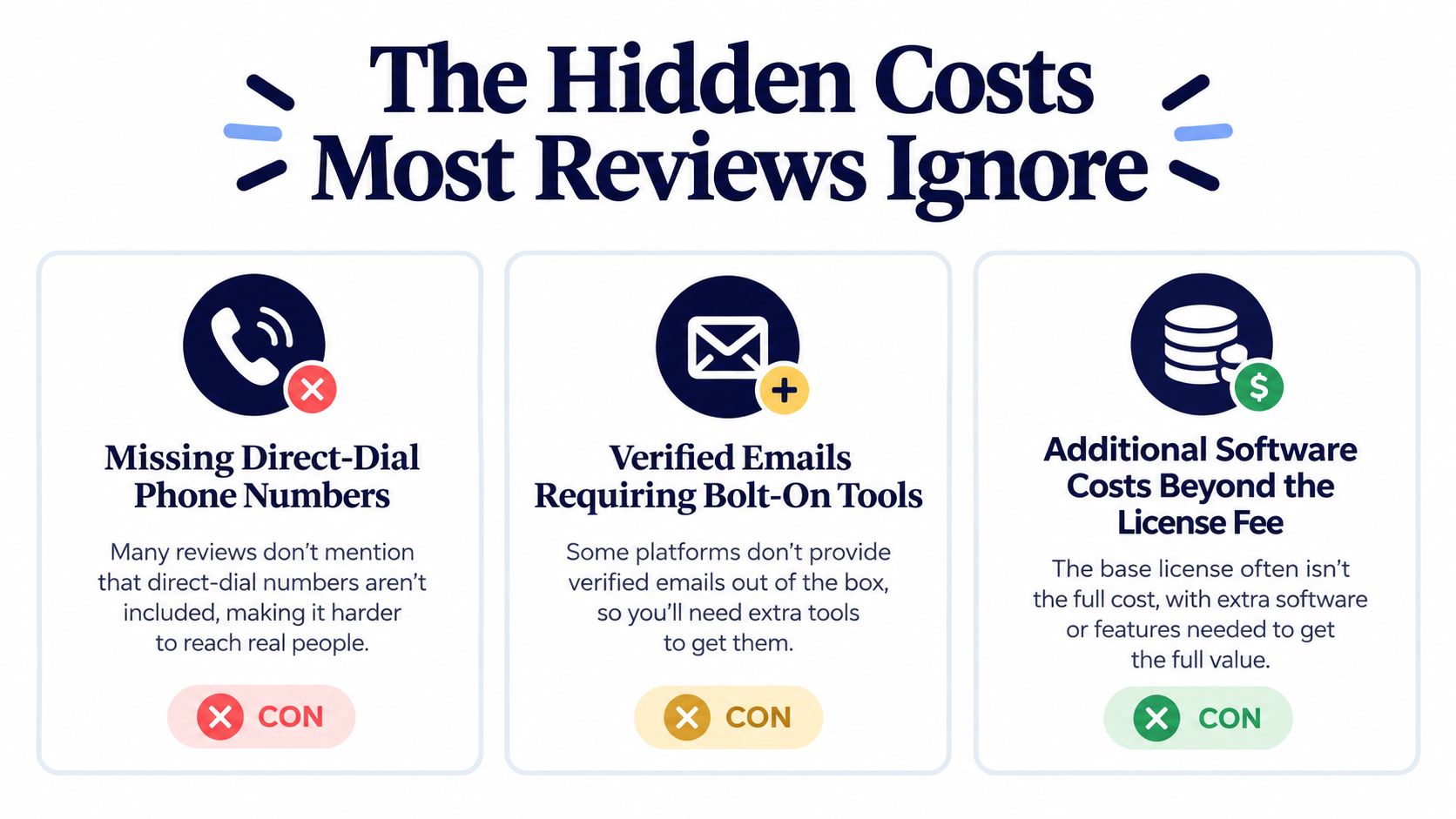
Sales Navigator provides prospect intelligence, not a complete outbound contact record. Teams that require verified email addresses or direct phone numbers usually add a data provider, then manage enrichment, duplicate records, consent, and field ownership. The license therefore understates the cost of a LinkedIn-led sales motion.
Contact data can add roughly US$50–100 per user per month. A Core seat paired with enrichment may therefore approach US$180–220 per user per month, rather than the advertised US$119.99. That difference matters when LinkedIn is only one of several acquisition channels.
InMail creates another capacity constraint. Core, Advanced, and Advanced Plus provide 50 InMail credits per month per user, with accumulation capped at 150 credits, according to LinkedIn's InMail credit documentation. A rep targeting several roles inside each account can use that allocation quickly, making email, phone, or sequencing tools necessary rather than optional.
The workflow tax
Seller time is the less visible expense. Reps must learn search logic, maintain saved lists, review alerts, personalize messages, update the CRM, and move records between LinkedIn and the sequencing system. Without a defined handoff, records remain incomplete or the same research gets repeated across tools.
Managers also handle account ownership, list naming, CRM field authority, and inactive-lead cleanup. Poor governance can create more records to reconcile, not fewer.
Practical rule: Price Sales Navigator as one layer in the outbound stack. Do not approve it as a replacement for contact data, sequencing, or CRM discipline.
The strongest case belongs to teams with a defined LinkedIn workflow and clear attribution. If LinkedIn is not the primary acquisition channel, the added data, administration, and seller time can outweigh the platform's prospecting value. A subscription cannot fix an unclear ICP, weak messaging, missing ownership, or unreliable measurement.
A 10-Minute Decision Framework
Use four pass-or-fail gates before buying. The purpose isn't to predict perfect ROI. It's to prevent a team from paying for capacity it won't use.
Gate one checks daily users
Count the full-time prospectors who will log in and perform meaningful work every day. A user qualifies only if they'll search, save leads, monitor accounts, or message prospects. If the planned users will open the product only for occasional research, fail this gate and start with free LinkedIn.
Gate two checks lead volume
Estimate targeted prospects per user per month. A working threshold of 300 targeted contacts per user per month can serve as a planning benchmark, but it isn't a verified Sales Navigator performance result. Treat it as an internal workload test: if the team can't identify enough relevant contacts to sustain the workflow, the filters may be unnecessary.
Gate three tests channel fit
Compare LinkedIn's contribution to past closed-won revenue with email, phone, referrals, and events. Pass only if LinkedIn already contributes meaningful revenue or if a controlled pilot can isolate LinkedIn-sourced meetings and opportunities. A team that mainly closes through calls shouldn't assume profile research will change that outcome.
Gate four defines measurement
Create the measurement plan before assigning seats. Track:
- InMail acceptance and reply: Separate replies from positive replies and booked meetings.
- Saved lead to opportunity conversion: Identify whether saved prospects progress beyond research.
- CRM synchronization accuracy: Check ownership, account matching, role, and activity fields.
- Meetings per paid seat: Compare output by user, territory, and account segment.
- Channel attribution: Record whether LinkedIn initiated, influenced, or merely supported the opportunity.
Run the pilot for 90 days, then make the renewal decision from sourced pipeline and workflow behavior. Don't use logins, searches, or saved-profile totals as the primary success criteria. Those metrics tell you that people used the software, not that the software earned its place.
Final Verdict and Frequently Asked Questions
Agency SDRs running a LinkedIn-first motion have the clearest case for Advanced, particularly when shared account work and CRM coordination matter. Solo freelancers with fewer than 200 targeted prospects per month should usually stay with free LinkedIn unless a paid license can be tied to a realistic project opportunity. Enterprise AEs should buy only when CRM integration, account intelligence, and relationship mapping strengthen an existing account-based process.
Is LinkedIn Sales Navigator worth it in 2026?
It is worth it when LinkedIn is your primary acquisition channel and the team measures sourced or influenced pipeline. It isn't a universal replacement for contact data or email sequencing.
How many InMail credits do you get?
Core, Advanced, and Advanced Plus each provide 50 InMail credits per month per user. Unused credits can accumulate up to 150 total credits, subject to LinkedIn's rolling-credit rules.
Do saved leads count toward the limit?
Yes. LinkedIn documents a combined capacity of 10,000 saved leads and accounts per user across Core, Advanced, and Advanced Plus.
Why do prices appear to have risen since 2024?
The available verified data confirms the current published prices, but it doesn't establish a verified percentage increase since 2024. Don't use an estimated increase in an ROI model without comparing your historical invoice with LinkedIn's current plan terms.
What are the cancellation terms for annual contracts?
The supplied evidence doesn't verify a universal cancellation or refund rule for every annual contract. Review the terms shown in your LinkedIn checkout and contract before prepaying.
Earlybird AI is an Upwork automation platform that searches for suitable projects, drafts personalized proposals, replies to client messages, and supports analytics and multi-user workflows for agencies. If your acquisition motion is centered on Upwork rather than LinkedIn, visit Earlybird AI to compare an automated channel workflow with the manual prospecting model described here.




