
← Back To Blog
Leads That Work: A Practical Upwork Outreach Playbook

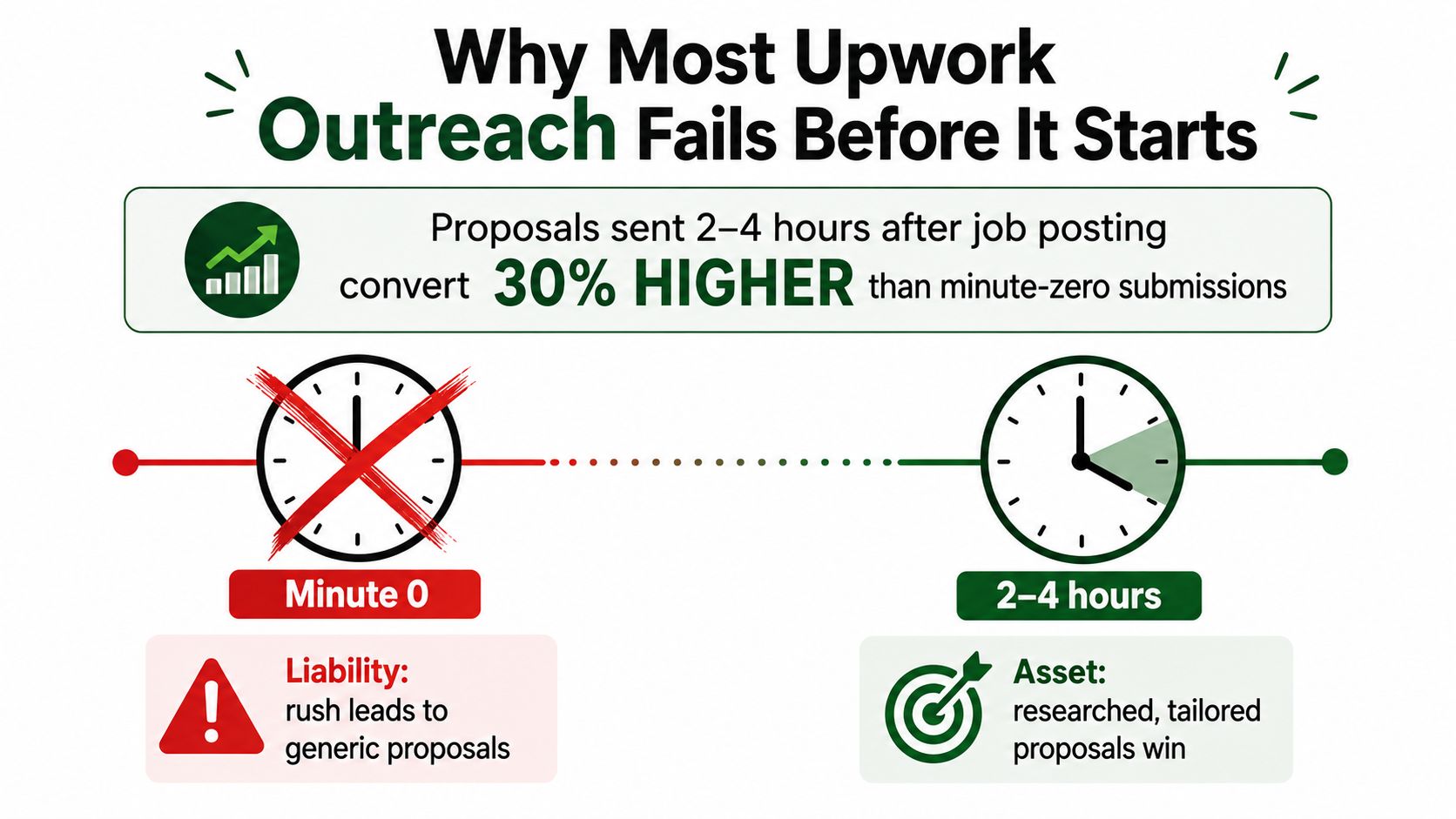
The fastest proposal doesn't automatically become the strongest lead. On Upwork, minute-zero bidding can put you into the noisiest part of the rush, where generic applications compete before the client has clarified what they need. Published timing data points to a more useful contrarian window: proposals sent 2 to 4 hours after a job is posted reached a 24.3% reply rate, while the earliest rush performed materially worse, as documented in Upwork proposal timing analysis.
That doesn't mean you should ignore fresh opportunities. It means speed is one input, not the strategy. Leads that work come from fit, intent, timing, personalization, disciplined follow-up, and careful use of Connects. The playbook below is built for agencies and freelancers who'd rather win fewer, better-fit conversations than burn their budget racing every new listing.
Why Most Upwork Outreach Fails Before It Starts
The popular “apply fast, apply often” rule confuses activity with qualification. Sending a proposal within minutes may help when you're a genuine domain expert with an unusually strong match, but it can hurt when the posting is vague, crowded, or still being edited by the client. The 2026 analysis linked above found that the 2 to 4 hour window produced a 24.3% reply rate, while the earliest rush performed materially worse. That pattern suggests that waiting can give you time to understand the brief, assess the client, and write a proposal that doesn't sound like it came from a keyboard shortcut.
The minute-zero rush also attracts bidders who haven't read the scope. Clients see the same recycled opening, the same broad claims, and the same portfolio link repeated across unrelated applications. A slower, more deliberate proposal can signal that you understood the work rather than merely spotting a new listing.
Practical rule: Don't ask, “How quickly can we submit?” Ask, “How quickly can we determine whether this deserves a Connect?”
Three silent killers account for much of the waste:
- Copy-paste templates: A template that could fit a logo, a SaaS dashboard, and a Shopify migration probably fits none of them well.
- Weak profile-to-job fit: Adjacent experience isn't the same as proof of competence. A general developer profile won't carry the same weight on a specialized migration as a focused implementation profile.
- Low-budget pursuit: Some jobs can't support your minimum rate after platform fees, revisions, meetings, and delivery risk. Winning them can create a poor client relationship rather than useful revenue.
Define a working lead before you bid
I use three filters before a bidder spends Connects.
Service fit asks whether the job matches a defined offer. “Web development” is too broad. “Shopify-to-headless migration for established ecommerce stores” gives the bidder a clear reason to apply and a relevant proof stack.
Intent fit looks for a real problem and a concrete deliverable. A detailed interview question, a stated timeline, existing technical context, or a description of the desired outcome indicates more intent than a post that only asks candidates to “send examples.”
Budget fit means the posted or implied budget clears your minimum hourly or fixed rate after platform fees. A client doesn't need to publish a perfect budget, but the project should contain enough scope and commercial context to justify a serious conversation.
Upwork signals help turn those filters into observable decisions. Check whether the payment method is verified, whether the client has a hiring history, whether prior hires resemble the requested work, and whether the interview questions show that the client knows what needs to be delivered. A referenced timeline is useful because it gives you a basis for sequencing and urgency. None of these signals guarantees a hire, but together they reduce avoidable ambiguity.
Apply the filters to a real brief
Suppose the same designer sees a $200 logo redesign and a $2,000 brand identity system. The first may be viable if it requires a contained refresh, has clear source files, and matches the designer's small-project offer. If the client expects strategy, multiple concepts, brand guidelines, and unlimited revisions, the budget fit fails even though the service appears related.
The identity system deserves a different treatment when the brief names the audience, deliverables, timeline, and decision process. The designer can propose a defined sequence, show relevant identity work, and ask one useful question about brand positioning. That is a lead that works because service fit, intent fit, and budget fit all light up, and the proposal can be written without inventing the scope.
Sourcing Qualified Upwork Leads
Upwork offers several discovery paths, and each one produces a different kind of opportunity. The main Job feed gives you breadth, but it also exposes you to noise and encourages impulsive bidding. Category filters, client history, and carefully chosen search terms make the feed more useful, especially when your offer is narrow.
Saved Searches with email alerts are usually the most effective discovery channel for a specialized agency. Build 5 to 10 saved searches around specific offer phrases, not broad skills. For example, a technical agency might separate “Shopify headless migration,” “Hydrogen ecommerce,” and “Shopify performance audit” rather than placing every ecommerce term into one alert. The trade-off is alert fatigue, so retire searches that repeatedly produce poor-fit listings.
Invitations are a different asset. A strong profile and clear positioning can bring opportunities to you, reducing the need to compete in every feed. The plan notes identify invitation conversion as 40% to 60%, but that figure isn't included in the verified data available for this article, so treat invitations qualitatively: they can convert well when your profile answers the client's need before the conversation starts. The risk is profile neglect. A polished search routine can't compensate for a profile that looks generic.
External sourcing through LinkedIn, Slack communities, and niche forums can pre-warm a client who later chooses Upwork for contracting. It usually has a slower cycle, but the conversation can begin around a known problem rather than a cold application.
The recommended sourcing mix is 40% main feed, 30% saved searches, 20% invitations and profile-driven work, and 10% external channels. Adjust it after tracking outcomes, not because the split looks tidy.
| Channel | Best For | Expected Reply Rate | Main Risk |
|---|---|---|---|
| Main Job feed | Breadth and active demand | Measure by offer | Feed spam can burn Connects |
| Saved Searches | Niche jobs with clear intent | Measure by search | Alert fatigue |
| Invitations and profile SEO | Inbound-fit opportunities | Measure by invitation source | Profile neglect |
| External sourcing | Pre-warmed conversations | Measure by source | Slower cycle |
For a broader operating model, see this Upwork lead generation tool, then keep the actual sourcing decision tied to the quality of conversations it produces.
Qualifying Leads in Under a Minute
A qualification filter should be fast enough to use before the application screen becomes a temptation. I score five signals, then place each posting into pass, review, or skip.
- Client hire history: Look at prior hires, hiring activity, and whether the client has completed similar projects. A relevant hiring pattern supports a pass; an empty or confusing history usually deserves review.
- Payment status: A verified payment method removes one avoidable uncertainty. An unverified method isn't an automatic rejection, but it raises the review burden.
- Spend level: The infographic uses total spend greater than $500 as a screening signal. Treat it as a directional filter, not a guarantee, because a new but serious client can still have a clean account.
- Brief clarity: Match your skills exactly to the job description. Specific deliverables, interview questions, and a timeline support a pass.
- Risk cues: Budget ambiguity, sprawling interview-heavy scope, contradictory requirements, or requests for extensive unpaid work should move the posting to skip or review.
The final decision should account for the cost of being wrong. If the proposal requires many Connects and the job asks for a lengthy interview process, a borderline lead needs stronger evidence before submission. If the brief is clear and the required Connects are modest, review may be reasonable even when the client's history is limited.

Use this batch script across 10 saved-search hits: “Pass if the offer matches, the client appears able to hire, and the brief names a real outcome. Review if one signal is missing but the economics work. Skip if the scope, budget, or client behavior makes the proposal hard to justify.” Record the decision instead of reopening the same listing repeatedly. A documented lead qualification framework makes team decisions more consistent.
Crafting Proposals That Earn Replies
A proposal for a $4,500 Shopify-to-headless migration shouldn't begin with “I can help.” It should mirror the client's actual problem. If the brief says the current storefront is slow, difficult to customize, and blocking merchandising changes, the opening should acknowledge those constraints and connect them to the proposed migration.
The proof stack comes next. Use two relevant case studies, but explain the connection: one might demonstrate Shopify architecture, while the other proves experience with performance-sensitive storefronts. The point isn't to display your entire portfolio. It's to show that your past work resembles the client's risk.
A scoped mini-plan can be short:
- Audit: Confirm the current Shopify theme, app dependencies, analytics, and content model.
- Architecture: Define the headless boundary, frontend approach, preview workflow, and deployment sequence.
- Migration: Move a controlled slice first, test checkout and tracking, then expand.
- Handoff: Document the operating model so the client's team can manage content without relying on the development team for every change.
End with one clarifying question, such as whether the client plans to preserve the current CMS workflow or replace it. Close with a realistic timeline and budget range only after the scope supports one.
| Proposal Element | Reply Rate Lift |
|---|---|
| Problem-specific opening | Track against generic openings |
| Relevant proof stack | Track by matched case study |
| Sequenced mini-plan | Track by scope clarity |
| One expert question | Track by question type |
| Clear next step | Track by close format |
These rows are testing categories, not verified lift percentages. The useful benchmark is your own segmented data. Advanced personalization matters because generic emails typically receive 1% to 5% reply rates, while advanced personalization is grouped at 9% to 15%, and signal-based personalization at 15% to 25%, according to cold email personalization benchmarks. Upwork proposals aren't identical to cold emails, but the underlying lesson carries: context beats templates.
For fixed-price builds, use a structure like this:
“You need [specific outcome], not just [surface deliverable]. I'd handle it in [three concise stages], with [defined handoff]. Based on the brief, I'd expect [scope boundary] and would confirm [one question] before locking the final estimate.”
For retainers, shift the emphasis to operating cadence:
“I can take ownership of [recurring responsibility] with a weekly priority review, a defined response window, and reporting on [business output]. I'd start by auditing [current system], then recommend the first maintenance and growth priorities.”
Submitting 2 to 4 hours after posting gives you room to read the brief carefully and adjust the hook. Submit sooner when your domain expertise is unusually exact and the client needs an immediate specialist response. For additional proposal structure, the Julip proposal guide offers useful ideas for organizing persuasive project narratives.
Follow-Up Cadences That Convert Without Spamming
Follow-up works when each message gives the client a reason to reopen the conversation. It fails when the bidder repeats “just checking in” five times. I use a five-touch sequence, but I stop or adapt it whenever the client replies, reopens the chat, changes the brief, or clearly declines.
Build the sequence around a reason
At 48 hours, send a value-add bump of no more than 80 words. Share one relevant observation from the brief, such as a tracking risk in a migration or a missing dependency in a redesign. Trigger it only when there's no reply.
At day 5, send a question-based bump of no more than 50 words. Ask whether the client has decided between two approaches or whether a stated constraint has changed. A question creates a natural response path without demanding a meeting.
At day 10, send a soft close of no more than 60 words. Offer two possible time slots for a short call, but don't manufacture urgency. If the client hasn't engaged, the message should make it easy to decline.
At day 14, use a referral-style bump of no more than 45 words. Mention the type of project you usually handle and invite the client to keep your profile in mind for a better-fit need. At day 21, send a graceful breakup of no more than 35 words, then archive the opportunity unless the client reopens the chat.
Move from chat to a quick Zoom when the client answers a scope question, asks about process, shares access requirements, or requests a quote. Walk away when the client avoids scope, repeatedly expands unpaid work, or treats every follow-up as a request for more free consulting.
Upwork's own guidance says freelancers should ideally respond within two hours and no later than seven days, with active contracts requiring a reply within seven days under the Optional Service Contract Terms, as explained in Upwork's responsiveness guidance. Your follow-up system should therefore protect active conversations first.
Automation needs limits. Cap daily sends, randomize delays, and require human review for any message containing pricing, scope changes, or a calendar invitation. Use a tool such as generate professional follow ups for drafting assistance, not as permission to send identical messages without review. The Upwork follow-up guide can help turn these rules into a team process.

Measuring the Metrics That Matter
Connects spent and proposals sent describe effort, not business quality. A working dashboard should tell you which offers, clients, send windows, and proposal structures produce replies, interviews, and hires.
Track each application in a spreadsheet with these fields:
- Opportunity data: Date, job category, offer type, client spend history, payment status, and brief clarity.
- Submission data: Send time, proposal age at submission, Connect cost, template version, and assigned bidder.
- Outcome data: Reply, interview, call, hire, project value, and reason for rejection when known.
Segment reply rate by proposal age, especially 0 to 30 minutes versus 2 to 4 hours. The timing analysis linked earlier found that the later window produced a 24.3% reply rate, while the earliest rush performed materially worse. That result should guide a test, not become a universal rule. A specialist may win quickly on a narrow project, while a generalist may need the extra research time.
The broader funnel explains why quality matters. One benchmark synthesis reports that 2.3% of website visitors become leads, 31% of leads become MQLs, and 13% of MQLs become SQLs, while 79% of marketing leads never convert to sales, according to lead quality benchmark data. These aren't Upwork-specific benchmarks, but they reinforce the operating principle: qualification prevents wasted effort as opportunities move toward revenue.
| Metric | How to Calculate | Healthy Benchmark | Red Flag |
|---|---|---|---|
| Replies per 10 bids | Replies ÷ proposals × 10 | Compare by offer and timing | Replies fall across matched jobs |
| Interview rate | Interviews ÷ proposals | Track qualified bidders | Replies don't become conversations |
| Hire rate | Hires ÷ proposals | Track by client fit | Calls produce no decisions |
| Average project value | Revenue ÷ won projects | Compare with minimum target | Wins require excessive effort |
| Connect efficiency | Connects ÷ replies | Lower is generally better | Costs rise without better fit |
The requested 15% to 25% reply, 5% to 10% interview, and 1% to 3% hire benchmarks aren't present in the verified data, so use them only as internal targets if your own historical results support them. A Monday review should take 15 minutes: retire templates that receive views but no replies, identify the source producing qualified conversations, and reallocate Connects toward that source.
Account-Safe Automation and Your Weekly Operating Rhythm
Automation should remove repetitive work, not remove judgment. Saved-search alerts are a reasonable use of automation, and scheduled sending through an approved Upwork API can be appropriate where the platform permits it. Third-party scraping, mass-applying tools, and identical-copy templates create account and quality risks, especially when nobody reviews the opportunity before submission.
Connects need their own control system. Upwork says Basic accounts receive 10 free Connects per month, Plus accounts receive 100 free Connects per month, and additional Connects cost $0.15 each, with a minimum purchase of 10 Connects, as described in Upwork's Connects rules. Proposal costs vary by listing and depend on factors including project size, scope, and market demand, with the required amount displayed in the job post, according to Upwork's proposal Connects guidance. Upwork also says freelancers can earn 18 free Connects after submitting at least three proposals and spending at least 54 Connects in total, a reward available twice per calendar month, as explained in Connects reward guidance.
Run the week as an operating loop
Monday: Audit last week's reply, interview, and hire outcomes.
Tuesday: Refresh qualification criteria using the jobs your team accepted and rejected.
Wednesday: Rewrite the weakest proposal template around a real client problem.
Thursday: Test a different send-time window, including the later window when the brief benefits from research.
Friday: Queue the next week's saved-search review and reserve Connects for high-fit opportunities.
Keep a daily lead review, a weekly proposal-writing block, and a human checkpoint before every automated send. Never automate pricing, scope interpretation, or a message that could be read as a commitment. For a broader way to assess the cost and return of process automation, consult this guide to workflow automation ROI.

A four-hour weekly block can cover the system: source qualified jobs, run the five-signal filter, personalize only the passed opportunities, submit in a tested timing window, schedule relevant follow-ups, and review the results. Earlybird AI is one option for agencies that want software to find Upwork jobs, generate personalized proposals, reply to client messages, and support follow-up workflows, while keeping human review in the operating process.
If your team is burning Connects on rushed applications, use the next week to audit timing, qualification, and proposal fit before increasing volume. Visit Earlybird AI to see how its Upwork workflow can support job discovery, personalized proposals, client replies, and call booking for agencies managing multiple bidders.




