
← Back To Blog
LinkedIn Sales Navigator Advanced: SDR Workflows
Your SDR has a carefully filtered list, a full queue of connection requests, and almost no shared context. One rep is messaging an account another rep already researched. Someone else is ignoring a buyer signal because it isn't tied to a clear action. The team has access to LinkedIn, but the workflow still behaves like a collection of individual searches.
LinkedIn Sales Navigator Advanced is useful when it changes that operating model. The upgrade isn't only about finding more people or sending more messages. Its practical value comes from shared account ownership, intent-led prioritization, AI-assisted research, warm-path discovery, and enough usage visibility to see whether the team is truly working the system.
Moving Beyond Basic Prospecting
A typical SDR starts the morning by opening a saved search, adding filters, and scrolling through profiles. They identify a title that looks right, copy a note into a spreadsheet, and send a connection request that could have been written for almost anyone in the market. By the afternoon, they have activity to report, but the manager still can't answer basic operational questions: which accounts are being worked, which signals justify outreach, and where two reps are approaching the same buyer.
That distinction matters. Basic prospecting finds candidates. Operational prospecting decides who deserves attention, why now is the right time, and who on the team should act. Advanced is designed for the second job.
LinkedIn launched Sales Navigator on July 31, 2014, and later described the product as having evolved from a new product into a “table stakes” tool for most B2B organizations in a company retrospective (LinkedIn's history of Sales Navigator). The product also moved quickly toward mobile use, with its iOS app launching in September 2014, and it eventually developed into three tiers, Core, Advanced, and Advanced Plus.
That progression explains why the Advanced plan feels different from a better search interface. LinkedIn built the higher tiers around teams, administration, and coordinated workflows. For a lean agency, that can mean shared lists instead of private spreadsheets, account handoffs instead of duplicated messages, and defined rules for turning signals into outreach.
The operational shift
The first change is psychological. Stop measuring success by how many profiles an SDR saves. Measure whether the team can move from an account signal to a relevant conversation without losing ownership or context.
A practical B2B LinkedIn prospecting playbook can help establish the fundamentals, but Advanced becomes valuable after those fundamentals are in place. Your ICP, account segments, message angles, and ownership rules should already be clear. The platform won't fix an undefined market or generic positioning.
Practical rule: If every rep builds a separate list from the same market, you're paying for individual activity instead of building a shared prospecting asset.
Advanced works best when the agency has several sellers, freelancers, or bidders touching the same target market and needs a common decision system. It won't automatically create discipline. It gives the team the components to build it.
Core Capabilities of the Advanced Tier
The feature difference between Core and Advanced is most important where multiple people share responsibility for pipeline. LinkedIn identifies CSV book-of-business uploads, Smart Links, Buyer Intent signals, shared custom lists, and shared saved searches as part of Advanced's broader collaboration and workflow set (LinkedIn's Advanced feature documentation).
The useful question isn't whether each feature sounds impressive. Ask what problem it removes from the team's daily work.
Shared ownership beats private lists
A CSV book-of-business upload gives a team a structured starting point for account coverage. Instead of asking each SDR to reconstruct a market from memory, a manager can define the account universe, divide ownership, and let reps work from a common reference point.
Shared custom lists and saved searches solve the next problem. They make the targeting logic visible. If one rep changes a title filter or creates a new account segment, other team members can use the same logic rather than developing competing versions independently.
That matters especially in agencies where account ownership may shift between salespeople, delivery leads, and freelancers. The list isn't just a prospecting convenience. It becomes a handoff layer.
Visibility is only useful when it changes behavior
For Advanced users, team admins can view login activity, search activity, and Social Selling Index data. Those signals are valuable as adoption indicators, not as a substitute for pipeline management (LinkedIn's admin visibility documentation).
Login activity can show whether seats are being used. Search activity can reveal whether reps are working inside the agreed ICP. Social Selling Index data may help identify participation patterns, but it shouldn't become a vanity leaderboard.
A manager should use these views to ask better questions:
- Search quality: Are reps searching the accounts and roles the team agreed to pursue?
- Workflow consistency: Are saved searches and shared lists part of daily work?
- Coverage gaps: Are important accounts untouched because ownership is unclear?
- Coaching needs: Does a rep need help translating a signal into a message?
Teams evaluating broader customer intelligence for growth teams should apply the same standard here. More data isn't operational intelligence until someone has a clear decision to make.
Advanced is also better suited to teams that don't want immediate CRM synchronization but still need collaboration across their stack. A practical comparison with Sales Navigator Core comes down to this: Core supports individual discovery, while Advanced gives a team more control over shared targeting and execution.
The plan earns its place when those controls reduce duplicated research and make account coverage visible. If one person uses Advanced as an expensive personal search tool, much of the operational value remains unused.
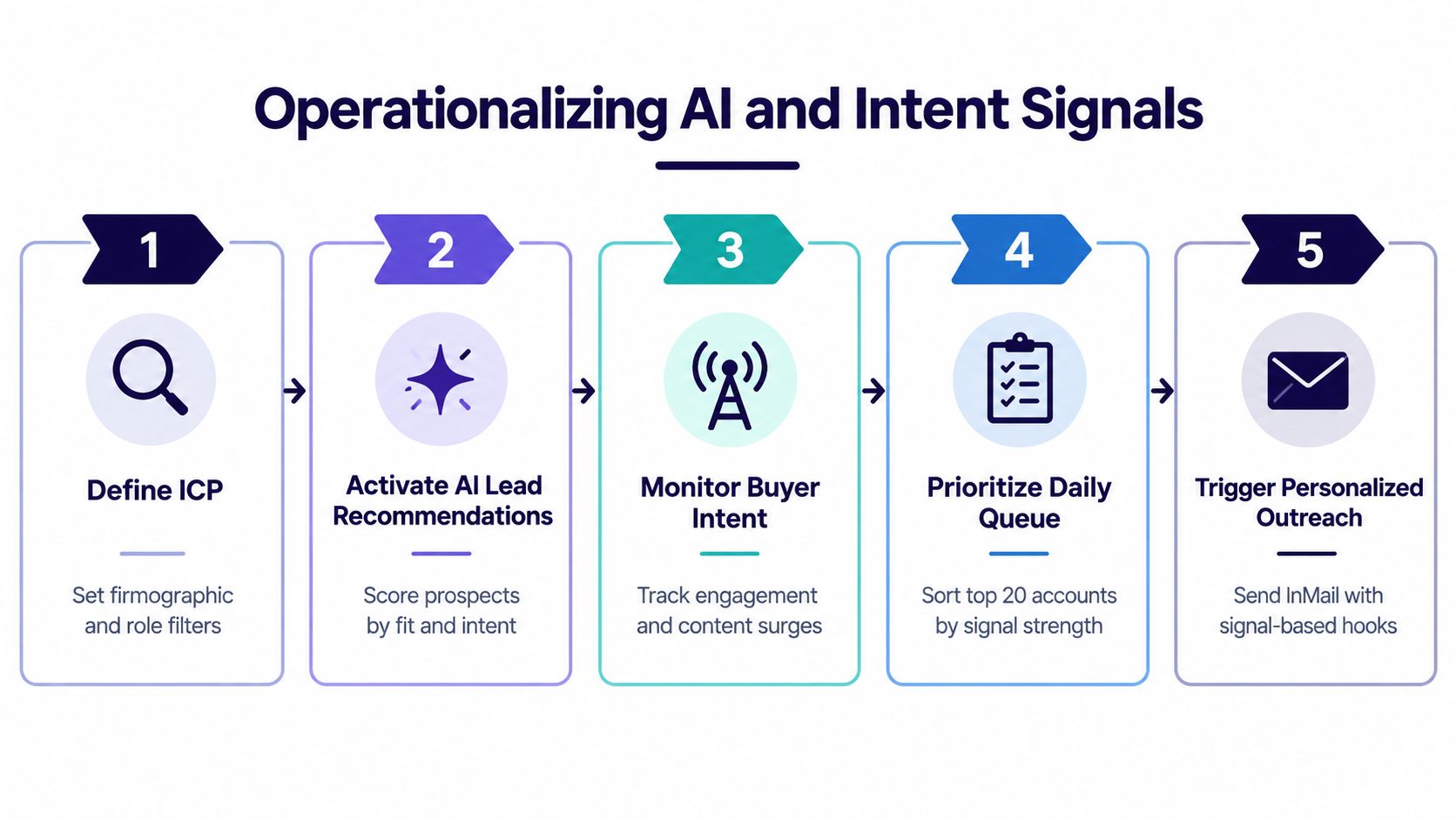
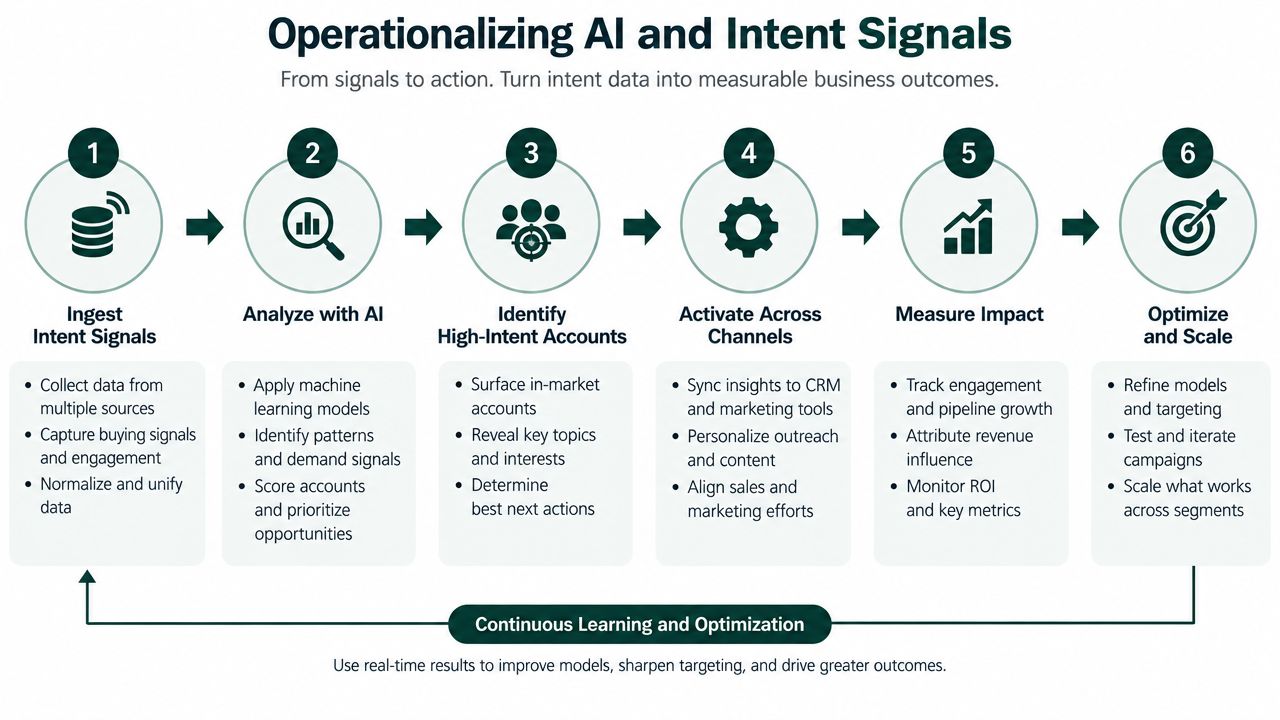
Operationalizing AI and Intent Signals
AI features create noise when reps treat every recommendation as a reason to contact someone. They become useful when the team defines what a signal means, how strong the evidence must be, and what action follows.
LinkedIn positions Advanced around AI-powered Account IQ, Buyer Intent, Smart Links, TeamLink, shared lists, and detailed usage reporting (LinkedIn's Sales Navigator overview). The platform supplies the prompts and signals. Your operating rules determine whether those inputs improve prioritization or just fill another dashboard.
Start with account context
Begin with the account, not the lead. Use Account IQ to create a quick working brief before assigning a message. The rep should understand the company's apparent business context, relevant stakeholders, and the reason it belongs in the target segment.
That brief shouldn't become a research essay. It needs to answer three practical questions:
- Why does this account fit the ICP?
- Which business problem might make the offer relevant?
- Which role is most likely to care about that problem?
Lead IQ then helps the SDR prepare for the individual conversation. Treat its output as a research aid, not verified buyer intent. The rep still needs to check the profile, role, company context, and recent activity before using any detail in outreach.
Convert Buyer Intent into a queue
Buyer Intent should change the order of work. It shouldn't automatically generate a message.
A workable morning routine looks like this:
- Review the signal: Identify the account activity or engagement that makes the account worth revisiting.
- Check fit: Remove accounts that don't match the ICP, even if the signal looks interesting.
- Select the stakeholder: Choose the role closest to the problem rather than messaging every visible employee.
- Create a signal-based hook: Reference the business context, not the existence of an internal platform signal.
- Assign the next action: Decide whether the rep should research, engage, request a warm path, or send direct outreach.
- Record the outcome: Keep the shared list current so the next rep understands what happened.
The daily queue should stay small enough for thoughtful execution. If every account is marked urgent, the system has stopped prioritizing.
AI should support judgment
Message Assist can speed up a first draft, but it shouldn't replace the rep's point of view. A generated message that repeats a generic company fact is still generic. The useful workflow is to let AI compress research, then require the SDR to add the specific observation and commercial hypothesis.
Teams building broader sales outreach automation should keep the same boundary. Automate preparation and reminders where possible, but preserve human review at the point where an unverified assumption could damage credibility.
The test is simple. Can the rep explain why this account is prioritized today in one sentence? If not, the signal hasn't been operationalized yet.
Leveraging TeamLink and Smart Links
TeamLink and Smart Links solve different problems, so combining them without a clear sequence usually creates clutter. TeamLink helps answer who can open the door. Smart Links helps answer whether the buyer engaged with the material. Standard InMail and connection requests don't provide the same workflow context.
TeamLink is most useful before the first cold message. LinkedIn says it helps users reach decision-makers faster through warm connections from teammates, while Advanced also includes Account IQ, Lead IQ, and personalized Message Assist outreach (LinkedIn's Advanced offering for small businesses).
TeamLink for access
Suppose an SDR identifies a decision-maker at a target account. The default action is often a connection request or InMail. TeamLink adds a better question: does someone on the agency team already have a credible relationship that can support an introduction?
The introduction still needs preparation. Give the colleague a concise reason for the request, the account context, and the specific ask. “Can you introduce me?” is weak. “Could you connect me with the person responsible for this area, and mention that we've helped similar teams address this operational issue?” gives the colleague something usable.
TeamLink isn't a guarantee of a response. A dormant connection may be less valuable than a well-timed cold message. The rep should judge the strength of the relationship rather than treating any shared connection as equally warm.
Smart Links for engagement context
Smart Links are useful after the team has a relevant asset, such as a capability overview, account-specific brief, or short case explanation. They can give the rep more context than a standard attachment, because the follow-up can reflect what the prospect chose to review.
The mistake is to turn content activity into false certainty. A view indicates engagement with the asset, not a buying decision. The follow-up should ask a relevant question or offer a useful next step, not announce that the prospect has been “caught” researching.
A content view is a conversation cue, not a qualification verdict.
For agencies, the comparison is practical:
- Connection request: Low-friction entry, but limited context and no inherent ownership discipline.
- InMail: Direct access to a non-connection, but the message still depends on relevance and timing.
- TeamLink: Potentially warmer access, provided the internal relationship is real and the introduction is specific.
- Smart Links: Better engagement context, provided the asset is useful and the follow-up remains respectful.
Use TeamLink to improve the route into an account. Use Smart Links to improve the timing and substance of the next interaction. Neither feature compensates for a weak offer.
Evaluating ROI for Lean Sales Teams
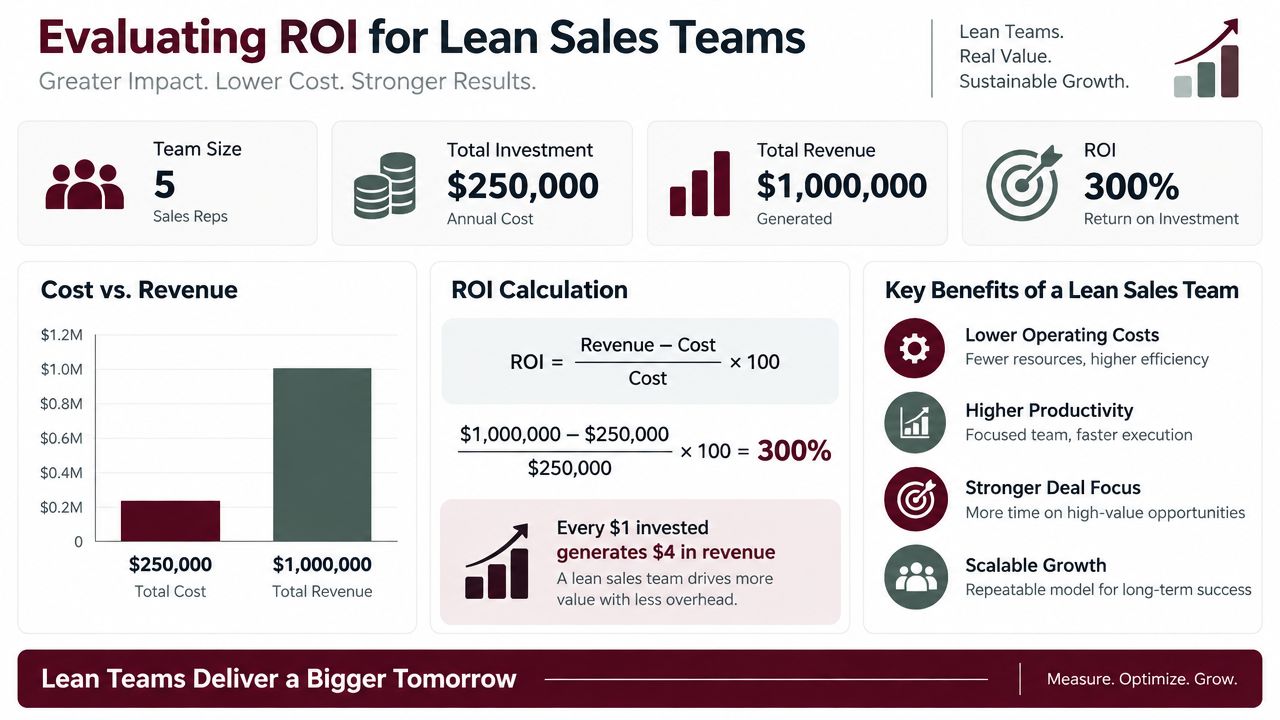
Advanced requires a more serious business case than “the team wants better filters.” LinkedIn's U.S. pricing page lists Sales Navigator Advanced at US$159.99 per month or US$1,799.88 per year per license (LinkedIn's plan comparison). LinkedIn also cites an Economic Impact Study reporting 30% revenue growth and 15% efficiency gains in North America on that same pricing page.
Those figures are directional evidence from LinkedIn, not a forecast for your agency. They don't tell you the payback period, the minimum number of seats, or which role will recover the cost. A lean team needs its own operating model.
Calculate value from recovered capacity
Start with the license cost, then identify the work Advanced is expected to improve. Don't count every saved minute as revenue. Count only capacity that can be redirected into qualified conversations, account research, proposals, or client delivery.
A simple internal model should separate:
- Seat cost: The subscription expense for the users who need collaboration features.
- Adoption cost: Time spent training reps, defining ownership, and maintaining shared lists.
- Recovered capacity: Research or coordination work the workflow removes.
- Pipeline value: The commercial value of additional qualified opportunities.
- Closed-won contribution: The profit or revenue that can reasonably be connected to those opportunities.
This prevents a common mistake. A team may show higher search activity without producing better conversations. Activity isn't the return. Better account selection, cleaner handoffs, and faster movement from signal to outreach are the mechanisms that might create a return.
Decide who needs Advanced
Not every seat deserves the upgrade. An agency might assign Advanced to the manager and the SDRs responsible for shared account coverage, while keeping occasional users on a simpler plan if their work doesn't depend on team lists or intent workflows.
Ask each proposed user:
- Will this person work from shared accounts?
- Will another teammate need visibility into their prospecting?
- Will Buyer Intent, Smart Links, or TeamLink change their daily decisions?
- Can the manager act on usage data without micromanaging?
- Is there a defined workflow for the signals they receive?
If most answers are no, the upgrade is probably solving a perception problem rather than a workflow problem. A useful framework for judging SDR value should include the quality of conversations created, not only the quantity of actions completed.
Treat LinkedIn's impact figures as a reference point
The 30% revenue growth and 15% efficiency gains cited by LinkedIn can inform the conversation, but they shouldn't be copied into an agency forecast. Your team may have a different market, sales cycle, offer, and level of LinkedIn adoption.
Build a conservative internal threshold instead. Define the commercial outcome that would cover the license, then decide which weekly behaviors should lead to that outcome. If the team can't agree on those behaviors, buying Advanced won't resolve the uncertainty.
Building a Collaborative SDR Workflow
Advanced becomes valuable through team habits, not through feature access. The rollout should begin with the shared operating layer, then add signal interpretation, and only later expand into deeper administration or CRM decisions.
Establish one account map
Create the initial book of business around the agency's ICP. Segment accounts by market, offer, geography, or ownership, then publish the logic in shared lists and saved searches. Each account needs a clear owner and a visible status, even if the broader sales process still lives outside a CRM.
Many teams fail at this point. They give reps access to shared lists but don't define who can add accounts, who can remove them, or what happens when a prospect becomes active. Without those rules, the list turns into another crowded inbox.
A practical minimum standard includes:
- Account owner: One person is responsible for the next action.
- Target roles: The team agrees which stakeholders matter.
- Signal definition: Buyer Intent or engagement must lead to a stated action.
- Handoff note: The next rep can understand what has already happened.
- Duplicate rule: No second outreach occurs without checking the shared record.
Roll out signals before dashboards
Start by teaching reps to prioritize a small set of signals. Ask them to explain why an account enters the daily queue and what message angle follows. Managers should inspect the reasoning during coaching, not demand that every activity look identical.
Only after the workflow is stable should the team emphasize admin reporting. LinkedIn documents that Advanced and Advanced Plus admins can see login activity, search activity, and Social Selling Index data, while Advanced Plus adds CRM sync and ROI reporting (LinkedIn's documentation on team visibility).
Use those views to find friction:
- A rep logs in but never uses shared searches.
- A search pattern drifts away from the agreed ICP.
- One person owns too many accounts while another has little coverage.
- Signals appear, but no outreach or follow-up follows.
The manager's role is to remove those obstacles. If reporting becomes a daily surveillance exercise, reps will optimize visible activity instead of meaningful prospecting.
Leave CRM integration for the right moment
Advanced suits teams that want collaboration without immediately building a CRM-heavy process. That can be an advantage for lean agencies, especially when the team is still refining its account model.
Don't add integration just because it exists. First prove that the team can maintain ownership, interpret signals, and document handoffs. Then decide whether deeper synchronization will reduce manual work enough to justify the operational complexity.
Common Questions About Advanced Features
Does Advanced require a large enterprise sales team?
No. LinkedIn positions Advanced for B2B sales teams with 2+ sellers that want collaboration, buyer insights, and AI tools without CRM integration yet (LinkedIn's small-business guidance). The relevant question isn't company size. It's whether multiple people need to coordinate account targeting and follow-up.
A small agency can benefit if duplicated outreach, scattered research, or unclear ownership already creates friction. A larger company may get little value if its reps ignore shared workflows and treat the platform as a private search tool.
Is Advanced the same as Advanced Plus?
No. Advanced focuses on collaboration and non-CRM syncing. Advanced Plus adds CRM synchronization and ROI reporting, making it more relevant when Sales Navigator must connect directly to an established revenue system (LinkedIn's tier documentation).
Choose Advanced when the immediate problem is coordinated prospecting. Consider Advanced Plus when CRM workflow, synchronized records, and formal return reporting are central requirements.
What should you do if reps distrust AI signals?
Don't ask them to trust the signals blindly. Run a short coaching process where reps record why an account was prioritized, what they observed, and whether the resulting conversation was relevant. Keep signals that consistently improve judgment, and discard workflows that create noise.
Is Advanced worth paying for if the team doesn't use a CRM?
It can be, provided the team actively uses shared lists, Buyer Intent, TeamLink, Smart Links, and agreed ownership rules. Without those behaviors, Core may be the more rational choice.
Earlybird AI is another workflow option for agencies that need automated prospect search, personalized proposals, replies, analytics, and multi-user workflows around Upwork accounts. Visit Earlybird AI to see how its automation model could complement a broader outbound process while your team builds a disciplined approach to account signals and follow-up.




