
← Back To Blog
Reducing Operational Costs: A Practical Agency Playbook
Your overhead didn't explode overnight. It crept up one subscription, one contractor, one half-used tool, one extra round of revisions at a time, until the margin you thought you had vanished into the monthly burn. That's the trap with reducing operational costs, most agency owners feel the pain everywhere and can't point to the exact leak.
The fix isn't guesswork. It's a hard audit, a ruthless ranking of levers by payback speed, and a refusal to keep paying for people or software that don't create client value.
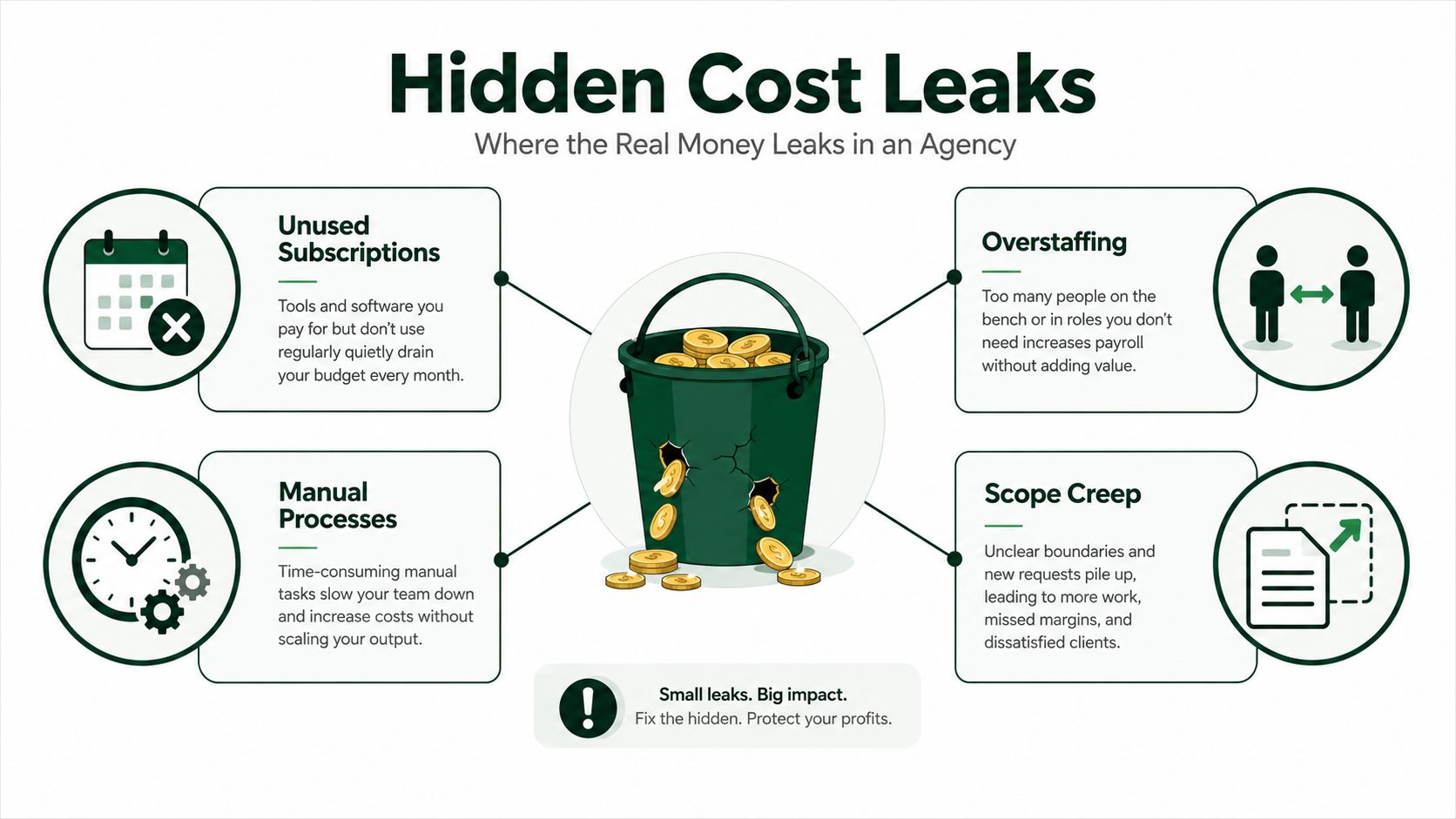
Where the Real Money Leaks in an Agency
The first mistake owners make is treating overhead like one big blob. It isn't. In a typical five- to thirty-person agency, the money usually sits in a few obvious buckets, people, software, vendors, facilities, and general overhead, then hides inside a dozen smaller recurring charges that nobody reviews after onboarding. That's why the bill keeps rising even when revenue doesn't.
The cleanest way to start is to build a baseline from accounting exports, bank feeds, and a subscription audit. Pull every recurring charge for the last full month, then sort it into columns for cost center, owner, monthly amount, business function, usage level, and cut action. If a line item doesn't have an owner, it'll drift forever.
Start with recurring spend, not the budget
A budget tells you what you planned to spend. A recurring-spend audit tells you what you're funding. The difference matters because agencies often approve software, retainers, and part-time help piecemeal, then discover they're paying for overlapping tools and duplicate work.
Practical rule: if you can't tie a recurring charge to a specific deliverable, client outcome, or risk control, it belongs on the cut list until proven otherwise.
The goal isn't to slash everything. It's to find the two or three cost centers swallowing the biggest share of monthly spend and effort. At a small agency, those are usually software, people, and outside vendors, with facilities and overhead trailing behind. Once you can see that split clearly, the savings stop feeling mysterious.
The American Institute of Architects notes that operational costs typically account for 6% to 15% of a company's total business expenses, and it reports that high-performance design can reduce operating costs by an average of 14% over five years for new construction and 13% over five years for green retrofits and renovations, with utility costs as a major lever in those savings AIA ROI on reducing operational costs. The point for agencies is simple, even modest gains matter when the base is large. Measure the base first, or you'll never know whether you saved anything.
The Four Levers That Move the Needle Fastest
An agency that wants real savings has four moves, eliminate, renegotiate, consolidate, and automate. Use them in that order. A license nobody opens gets eliminated. A contract with stale pricing gets renegotiated. Two tools doing the same job get consolidated. Repetitive work gets automated only after the process is clean enough to trust.
The discipline matters as much as the cut. The UK National Audit Office's structured cost-reduction cycle, strategy, planning, implementation, measurement, evaluation, and feedback, is the right way to keep savings from slipping back into the budget. If nobody owns the new process after the cleanup, the spend returns under a different name.
Use eliminate and renegotiate first
Start with eliminate when the waste is obvious. Cancel the unused tool, the duplicate seat, the forgotten add-on, the retainer nobody can explain. This is the fastest win because it removes cost immediately, but sloppy cuts can also remove capability you still need.
After that, go after renegotiate. Vendor contracts, software renewals, and agency retainers usually carry more room than the person holding the invoice wants to admit. Many agencies skip this work because they hate the conversation. That is a bad habit. Vendors price for inertia, and inertia is expensive.
Consolidate before you automate
Use consolidate when the stack has overlap. Three reporting dashboards with different owners are wasted effort. Separate email and chat sequences for the same client workflow create the same problem. Collapse the stack first, then automate what remains. If you automate a scattered process, you only make the mess faster.
Do this before software changes: map the process, name the owner, then decide whether the work should disappear, be automated, be merged, or be bought cheaper.
Automation comes last because it compounds whatever process you feed it. A broken workflow with better software is still a broken workflow. It just costs more to fix later.
For a practical comparison of whether to build, buy, or combine AI tooling around operations, AI tooling comparison for COOs is a useful reference point. Use it as a decision aid, not as a reason to keep manual work alive.

The first 90 days should focus on elimination, renegotiation, and consolidation. That is where the quickest payback sits. Save automation for the work that repeats, can be measured, and has already been documented.
Automating the Work That Eats Your Week
Automation is the strongest lever for agencies because it attacks the repeatable work that burns hours without adding judgment. Kibo's reporting cites Gartner-linked data showing automation in fulfillment can reduce operational costs by up to 30%, and it says a company with $1.5 billion in revenue could see about $45 million annually from that level of reduction. The same brief adds that 61% of operational cost savings are attributed to process digitization, and 90% of organizations that optimize operations report reduced costs Kibo automation reporting. Those numbers are not agency-specific, but the direction is unmistakable, digitized process beats manual busywork.
Automation pays back fastest in work that repeats every week, proposal writing, lead sourcing, client replies, follow-up sequences, reporting, and QA checks. If a task has a clear trigger, a clear output, and a clear exception path, it's a candidate. If it depends on taste, strategy, or relationship repair, keep a human on it.
Automate the workflows with obvious baselines
The first move is to document the manual version. Don't buy software first. Write down who does the task, what they touch, what they check, and where it stalls. Only then should you automate.
A useful checklist for agencies looks like this.
- Proposal intake: capture job details, score fit, and route qualified leads without human sorting.
- Client replies: answer routine questions fast, then escalate only exceptions.
- Follow-up sequences: keep contacts warm without forcing an account manager to remember every nudge.
- Reporting pulls: replace manual screenshot collection and spreadsheet assembly.
- QA checks: flag missing fields, broken links, or inconsistent positioning before a deliverable goes out.
- Lead sourcing: monitor inbound and outbound opportunities without daily hand searching.
- Invoice prep: assemble the data before finance has to chase it.
- Content approval routing: move drafts through the right reviewers automatically.
- Meeting scheduling: cut the back-and-forth.
- Internal reminders: stop letting important tasks depend on memory.
The technical warning is simple. Automating a broken process just accelerates inefficiency. That's why the baseline matters. If the current workflow is messy, standardize it first, then automate the clean version.
You can see the same logic in practical workflow design at how to automate repetitive tasks. It's not about chasing fancy tech. It's about removing the stuff your team hates doing twice.
If you want one hard rule, use this. Automate the tasks that are repetitive, rule-based, and tied to obvious time loss. Leave judgment-heavy work alone until the repetitive layer is gone.
Replacing or Augmenting SDR Effort With Earlybird AI
Most agencies overspend on sales development because they pay humans to do tedious work that software can handle faster. SDRs spend their days sourcing jobs, writing proposals, replying to client messages, and following up. That's valuable only when the human adds judgment. Most of the time, the role turns into expensive queue management.
A better model is to let the machine do the first pass and keep humans on the edge cases. Earlybird AI connects to an Upwork account, learns ideal projects from thumbs-up and thumbs-down feedback, then searches, drafts personalized proposals, and replies to client messages automatically. Proposals go out within about 10 minutes of posting, replies land in under 5 minutes, and the system keeps following up until a call is booked.
Compare the spend, not the hype
The cost math is plain. If an SDR costs roughly a few thousand dollars a month loaded, an automation platform that runs the outbound motion continuously doesn't need many wins to justify itself. A single new client can offset the subscription in a way that a junior hire rarely can, because software doesn't need ramp time, context switching breaks, or hand-holding to keep working.
That matters even more for agencies with multiple bidders or multiple freelancer accounts. A multi-user workflow reduces internal coordination overhead, and a dedicated Success Agent lowers the training tax that usually comes with new tools. Human-behavior mimicry and clean regional IPs matter too, because account safety isn't optional when the sales channel is Upwork.
If you want the role definition behind this, what a sales development representative does is a useful baseline. The point is not to worship the title. The point is to strip the role down to the work that requires a person.
Practical rule: if the task is message volume, response speed, or proposal throughput, software should own it first. If the task is deal judgment, client nuance, or strategic repositioning, keep a human in the loop.
A major advantage here is timing. When the platform keeps proposals moving quickly and follows up without letting leads cool off, the sales cycle gets shorter and the inbox stops deciding your pipeline. That's the sort of operational change that replaces headcount pressure with system discipline.
Staffing, Outsourcing, and the True Cost of Headcount
Headcount looks clean on a spreadsheet and messy everywhere else. Lean in-house teams give you context and control, but they cost more and they're harder to resize. Contractors give you flexibility, but every handoff adds coordination overhead. Outsourcing can drop monthly burn, but it can also create brand risk, quality drift, and communication lag if you don't manage it tightly.
The hidden costs are the problem. Rushed handoffs create rework. Overworked juniors quit. And when ten freelancers bring ten different tool stacks, SaaS sprawl shows up behind the scenes and nobody owns it.
Choose the model by task type, not preference
A founder's instinct is often to keep everything in-house because it feels safer. That's fine for client relationships and creative judgment. It's a bad default for repetitive production work, bookkeeping, and admin-heavy tasks.
If you need a useful reference on how outsourced analysis work can be structured, HelpWithMetrics for founders is a relevant example of how specialists can absorb non-core work without turning the agency into a permanent staffing farm. The lesson is narrower than the service line, though. Outsource only what can be measured, spec'd, and checked.
The salary side matters too, especially when you compare the people cost against the value of a workflow. For agencies hiring around growth, marketing agency salaries should be read against the revenue each role protects or creates. A role that doesn't protect client relationships or close business should face a high bar.
A six-person agency doesn't need a bloated middle layer. One operations lead, a curated contractor bench, and a few solid automations often beat two junior seats because the team spends less time coordinating and more time shipping.
The decision rule is blunt. Insource roles that touch client relationships and creative judgment. Automate or outsource roles that are repetitive and measurable. If you can't explain why a task needs an employee every week, it probably doesn't.
The 90-Day Cost Reduction Roadmap
Start with a hard reset. The first 30 days should expose waste, remove it, and stop the bleed before you touch anything structural. Cancel unused subscriptions, shut down shadow IT, pull every recurring vendor charge into one view, and renegotiate the easiest contracts first. Keep a simple baseline for spend, headcount, and workflow volume, because every savings claim after that has to beat it.
The next 30 days should target the work that drains time without creating value. Automate the top three repetitive workflows, merge overlapping tools, and redesign any role that mostly moves information from one system to another. That means fewer handoffs, fewer approvals, and fewer places for work to stall. Review the numbers every week, not at the end of the month, or you will miss where the savings are leaking back out.
Lock the savings into the operating system
The final 30 days decide whether the program sticks or gets reversed. Lock the savings into budgets, assign one owner for monthly cost review, and make proof part of the operating rhythm. The point is discipline, not ceremony. If a cut is real, it should show up in the next billing cycle, the next budget pass, and the next team plan.
Use CallZent cost-cutting guide as a practical reminder that savings hold only when the underlying process changes. That is the part many agencies miss. They remove spend, then leave the old habits in place, so the cost creeps back in through exceptions, rework, and tool sprawl. Treat the 90-day plan as a sequence of decisions, not a cleanup project.
A simple timeline keeps the work honest.
TimeframeWhat to doWhat success looks likeDays 1 to 30Cut obvious waste, pull vendor charges, reset the baselineUnused spend is gone, and the baseline is clearDays 31 to 60Automate repetitive work, merge tools, redesign low-value rolesFewer handoffs and less manual effortDays 61 to 90Lock changes into budgets, owners, and review cadenceSavings stay in place after the quarter ends
Use a decision rule when a change stalls. If the item is easy to cut and nobody can defend it, cut it now. If the work is repetitive but still necessary, automate it. If the role still needs judgment, keep the person and remove the admin around them. If a vendor or workflow still survives after those tests, it needs a clear owner and a reason to exist.
For agencies that need a sharper view of where savings come from, the CallZent cost-cutting guide reinforces the same practical lesson. Reduce the work, then force the new process to stay in place. Savings only matter when they survive beyond the first round of enthusiasm.
Tracking the Right KPIs Without Drowning in Dashboards
You don't need ten dashboards. You need one page that a CFO, partner, or ops lead can use. Put the metrics into three buckets, cost KPIs, productivity KPIs, and revenue protection KPIs, then review them every month with one named owner.
The danger in cost reduction is obvious and expensive. Teams celebrate lower spend, then ignore quality loss, rework, churn, or refund pressure until the next quarter blows up the margin they just saved. That's why spend alone is a lazy metric.
Keep the scorecard tight
Your cost audit baseline should feed directly into the scorecard. If the baseline showed software bloat, track software spend per head. If the baseline showed long reply times, track response time and time to first reply. If the baseline showed too much manual effort in proposals, track proposals per week and hours saved per workflow.
A good monthly review asks three questions. Did spend go down, did output stay stable, and did revenue protection stay intact? If any answer is no, the cost cut wasn't a win.
Operational rule: a dashboard is only useful if someone has to explain the numbers out loud every month.
For agencies that run on Upwork, Earlybird AI's analytics surface fits naturally as one input into that review because it ties outreach activity to reply speed and proposal flow. That's useful only if it sits inside a broader operating rhythm, not as a vanity report.
Reducing operational costs isn't a one-time cleanup. It's a quarterly discipline. Keep the baseline, keep the review, and keep the savings from leaking back out.
If you want a tighter operating system for your agency's Upwork pipeline, Earlybird AI can handle proposal writing, replies, follow-up, and analytics without adding headcount. Put it against your current SDR cost, compare the output against your baseline, and see whether the next client should come from software instead of another hire.




